> ## Documentation Index
> Fetch the complete documentation index at: https://wb-21fd5541-feature-automate-reference-docs-generation.mintlify.site/llms.txt
> Use this file to discover all available pages before exploring further.
# EvaluationLogger
> Flexible, incremental way to log evaluation data from Python code
The `EvaluationLogger` provides a flexible, incremental way to log evaluation data directly from your Python code. You don't need deep knowledge of Weave's internal data types; simply instantiate a logger and use its methods (`log_prediction`, `log_score`, `log_summary`) to record evaluation steps.
This approach is particularly helpful in complex workflows where the entire dataset or all scorers might not be defined upfront.
In contrast to the standard `Evaluation` object, which requires a predefined `Dataset` and list of `Scorer` objects, the `EvaluationLogger` allows you to log individual predictions and their associated scores incrementally as they become available.
**Prefer a more structured evaluation?**
If you prefer a more opinionated evaluation framework with predefined datasets and scorers, see [Weave's standard Evaluation framework](../core-types/evaluations.mdx).
The `EvaluationLogger` offers flexibility while the standard framework offers structure and guidance.
## Basic workflow
1. *Initialize the logger:* Create an instance of `EvaluationLogger`, optionally providing metadata about the `model` and `dataset`. Defaults will be used if omitted.
:::important Track token usage and cost
To capture token usage and cost for LLM calls (e.g. OpenAI), initialize `EvaluationLogger` before any LLM invocations\*\*.
If you call your LLM first and then log predictions afterward, token and cost data are not captured.
:::
2. *Log predictions:* Call `log_prediction` for each input/output pair from your system.
3. *Log scores:* Use the returned `ScoreLogger` to `log_score` for the prediction. Multiple scores per prediction are supported.
4. *Finish prediction:* Always call `finish()` after logging scores for a prediction to finalize it.
5. *Log summary:* After all predictions are processed, call `log_summary` to aggregate scores and add optional custom metrics.
After calling `finish()` on a prediction, no more scores can be logged for it.
For a Python code demonstrating the described workflow, see the [Basic example](#basic-example).
## Basic example
The following example shows how to use `EvaluationLogger` to log predictions and scores inline with your existing Python code.
The `user_model` model function is defined and applied to a list of inputs. For each example:
* The input and output are logged using `log_prediction`.
* A simple correctness score (`correctness_score`) is logged via `log_score`.
* `finish()` finalizes logging for that prediction.
Finally, `log_summary` records any aggregate metrics and triggers automatic score summarization in Weave.
```python
import weave
from openai import OpenAI
from weave import EvaluationLogger
weave.init('my-project')
# Initialize EvaluationLogger BEFORE calling the model to ensure token tracking
eval_logger = EvaluationLogger(
model="my_model",
dataset="my_dataset"
)
# Example input data (this can be any data structure you want)
eval_samples = [
{'inputs': {'a': 1, 'b': 2}, 'expected': 3},
{'inputs': {'a': 2, 'b': 3}, 'expected': 5},
{'inputs': {'a': 3, 'b': 4}, 'expected': 7},
]
# Example model logic using OpenAI
@weave.op
def user_model(a: int, b: int) -> int:
oai = OpenAI()
response = oai.chat.completions.create(
messages=[{"role": "user", "content": f"What is {a}+{b}?"}],
model="gpt-4o-mini"
)
# Use the response in some way (here we just return a + b for simplicity)
return a + b
# Iterate through examples, predict, and log
for sample in eval_samples:
inputs = sample["inputs"]
model_output = user_model(**inputs) # Pass inputs as kwargs
# Log the prediction input and output
pred_logger = eval_logger.log_prediction(
inputs=inputs,
output=model_output
)
# Calculate and log a score for this prediction
expected = sample["expected"]
correctness_score = model_output == expected
pred_logger.log_score(
scorer="correctness", # Simple string name for the scorer
score=correctness_score
)
# Finish logging for this specific prediction
pred_logger.finish()
# Log a final summary for the entire evaluation.
# Weave auto-aggregates the 'correctness' scores logged above.
summary_stats = {"subjective_overall_score": 0.8}
eval_logger.log_summary(summary_stats)
print("Evaluation logging complete. View results in the Weave UI.")
```
## Advanced usage
### Get outputs before logging
You can first compute your model outputs, then separately log predictions and scores. This allows for better separation of evaluation and logging logic.
```python
# Initialize EvaluationLogger BEFORE calling the model to ensure token tracking
ev = EvaluationLogger(
model="example_model",
dataset="example_dataset"
)
# Model outputs (e.g. OpenAI calls) must happen after logger init for token tracking
outputs = [your_output_generator(**inputs) for inputs in your_dataset]
preds = [ev.log_prediction(inputs, output) for inputs, output in zip(your_dataset, outputs)]
for pred in preds:
pred.log_score(scorer="greater_than_5_scorer", score=output > 5)
pred.log_score(scorer="greater_than_7_scorer", score=output > 7)
pred.finish()
ev.log_summary()
```
### Log rich media
Inputs, outputs, and scores can include rich media such as images, videos, audio, or structured tables. Simply pass a dict or media object into the `log_prediction` or `log_score` methods:
```python
import io
import wave
import struct
from PIL import Image
import random
from typing import Any
import weave
def generate_random_audio_wave_read(duration=2, sample_rate=44100):
n_samples = duration * sample_rate
amplitude = 32767 # 16-bit max amplitude
buffer = io.BytesIO()
# Write wave data to the buffer
with wave.open(buffer, 'wb') as wf:
wf.setnchannels(1)
wf.setsampwidth(2) # 16-bit
wf.setframerate(sample_rate)
for _ in range(n_samples):
sample = random.randint(-amplitude, amplitude)
wf.writeframes(struct.pack(' dict[str, Any]:
return {
"result": random.randint(0, 10),
"image": image,
"audio": audio,
}
ev = EvaluationLogger(model="example_model", dataset="example_dataset")
for inputs in rich_media_dataset:
output = your_output_generator(**inputs)
pred = ev.log_prediction(inputs, output)
pred.log_score(scorer="greater_than_5_scorer", score=output["result"] > 5)
pred.log_score(scorer="greater_than_7_scorer", score=output["result"] > 7)
ev.log_summary()
```
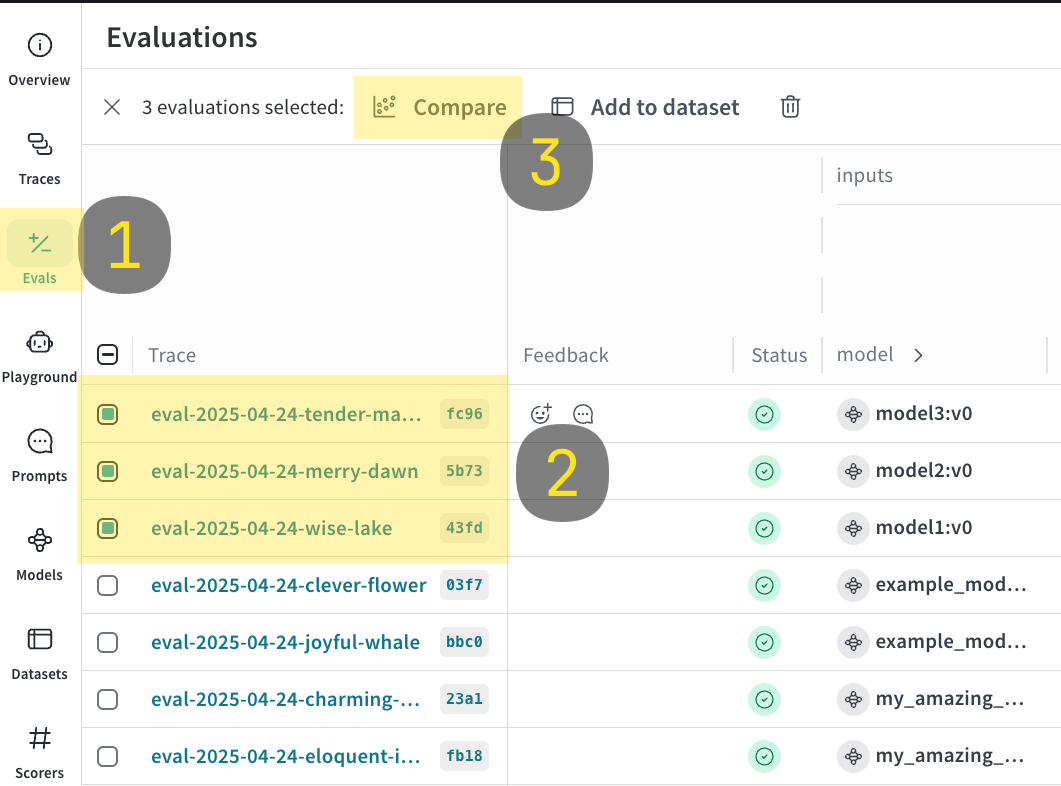
### Log and compare multiple evaluations
With `EvaluationLogger`, you can log and compare multiple evaluations.
1. Run the code sample shown below.
2. In the Weave UI, navigate to the `Evals` tab.
3. Select the evals that you want to compare.
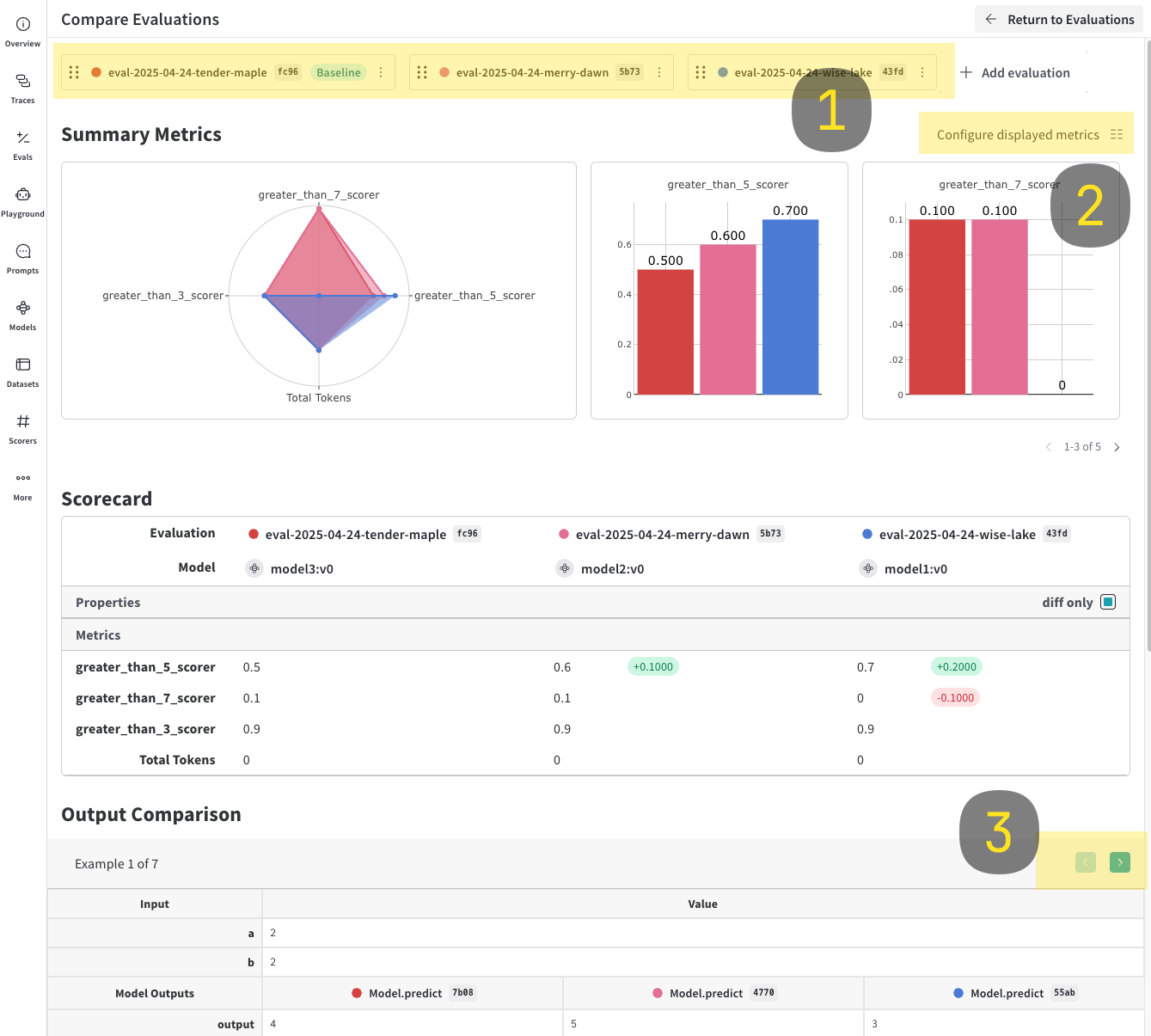
4. Click the **Compare** button. In the Compare view, you can:
* Choose which Evals to add or remove
* Choose which metrics to show or hide
* Page through specific examples to see how different models performed for the same input on a given dataset
For more information on comparisons, see [Comparisons](../tools/comparison.mdx)
```python
import weave
models = [
"model1",
"model2",
{"name": "model3", "metadata": {"coolness": 9001}}
]
for model in models:
# EvalLogger must be initialized before model calls to capture tokens
ev = EvaluationLogger(model=model, dataset="example_dataset")
for inputs in your_dataset:
output = your_output_generator(**inputs)
pred = ev.log_prediction(inputs=inputs, output=output)
pred.log_score(scorer="greater_than_3_scorer", score=output > 3)
pred.log_score(scorer="greater_than_5_scorer", score=output > 5)
pred.log_score(scorer="greater_than_7_scorer", score=output > 7)
pred.finish()
ev.log_summary()
```
## Usage tips
* Call `finish()` promptly after each prediction.
* Use `log_summary` to capture metrics not tied to single predictions (e.g., overall latency).
* Rich media logging is great for qualitative analysis.