> ## Documentation Index
> Fetch the complete documentation index at: https://wb-21fd5541-feature-automate-reference-docs-generation.mintlify.site/llms.txt
> Use this file to discover all available pages before exploring further.
# Inference
# W\&B Inference
*W\&B Inference* provides access to leading open-source foundation models via W\&B Weave and an OpenAI-compliant API. With W\&B Inference, you can:
* Develop AI applications and agents without signing up for a hosting provider or self-hosting a model.
* Try the supported models in the W\&B Weave Playground.
W\&B Inference credits are included with Free, Pro, and Academic plans for a limited time. Availability may vary for Enterprise. Once credits are consumed:
* Free accounts must upgrade to a Pro plan to continue using Inference.
* Pro plan users will be billed for Inference overages on a monthly basis, based on the model-specific pricing.
To learn more, see the [pricing page](https://wandb.ai/site/pricing/) and [W\&B Inference model costs](https://wandb.ai/site/pricing/inference).
Using Weave, you can trace, evaluate, monitor, and iterate on your W\&B Inference-powered applications.
| Model | Model ID (for API usage) | Type(s) | Context Window | Parameters | Description |
| ---------------- | ----------------------------------------- | ------------ | -------------- | --------------------------- | --------------------------------------------------------------------------------------------------------------------- |
| DeepSeek R1-0528 | deepseek-ai/DeepSeek-R1-0528 | Text | 161K | 37B - 680B (Active - Total) | Optimized for precise reasoning tasks including complex coding, math, and structured document analysis. |
| DeepSeek V3-0324 | deepseek-ai/DeepSeek-V3-0324 | Text | 161K | 37B - 680B (Active - Total) | Robust Mixture-of-Experts model tailored for high-complexity language processing and comprehensive document analysis. |
| Llama 3.1 8B | meta-llama/Llama-3.1-8B-Instruct | Text | 128K | 8B (Total) | Efficient conversational model optimized for responsive multilingual chatbot interactions. |
| Llama 3.3 70B | meta-llama/Llama-3.3-70B-Instruct | Text | 128K | 70B (Total) | Multilingual model excelling in conversational tasks, detailed instruction-following, and coding. |
| Llama 4 Scout | meta-llama/Llama-4-Scout-17B-16E-Instruct | Text, Vision | 64K | 17B - 109B (Active - Total) | Multimodal model integrating text and image understanding, ideal for visual tasks and combined analysis. |
| Phi 4 Mini | microsoft/Phi-4-mini-instruct | Text | 128K | 3.8B (Active - Total) | Compact, efficient model ideal for fast responses in resource-constrained environments. |
This guide provides the following information:
* [Prerequisites](#prerequisites)
* [Additional prerequisites for using the API via Python](#additional-prerequisites-for-using-the-api-via-python)
* [API specification](#api-specification)
* [Endpoint](#endpoint)
* [Available methods](#available-methods)
* [Chat completions](#chat-completions)
* [List supported models](#list-supported-models)
* [Usage examples](#usage-examples)
* [UI](#ui)
* [Access the Inference service](#access-the-inference-service)
* [Try a model in the Playground](#try-a-model-in-the-playground)
* [Compare multiple models](#compare-multiple-models)
* [View billing and usage information](#view-billing-and-usage-information)
* [Usage information and limits ](#usage-information-and-limits)
* [API errors](#api-errors)
## Prerequisites
The following prerequisites are required to access the W\&B Inference service via the API or the W\&B Weave UI.
1. A W\&B account. Sign up [here](https://app.wandb.ai/login?signup=true&_gl=1*1yze8dp*_ga*ODIxMjU5MTk3LjE3NDk0OTE2NDM.*_ga_GMYDGNGKDT*czE3NDk4NDYxMzgkbzEyJGcwJHQxNzQ5ODQ2MTM4JGo2MCRsMCRoMA..*_ga_JH1SJHJQXJ*czE3NDk4NDU2NTMkbzI1JGcxJHQxNzQ5ODQ2MTQ2JGo0NyRsMCRoMA..*_gcl_au*MTE4ODk1MzY1OC4xNzQ5NDkxNjQzLjk1ODA2MjQwNC4xNzQ5NTgyMTUzLjE3NDk1ODIxNTM.).
2. A W\&B API key. Get your API key at [https://wandb.ai/authorize](https://wandb.ai/authorize).
3. A W\&B project.
4. If you are using the Inference service via Python, see [Additional prerequisites for using the API via Python](#additional-prerequisites-for-using-the-api-via-python).
### Additional prerequisites for using the API via Python
To use the Inference API via Python, first complete the general prerequisites. Then, install the `openai` and `weave` libraries in your local environment:
```bash
pip install openai weave
```
The `weave` library is only required if you'll be using Weave to trace your LLM applications. For information on getting started with Weave, see the [Weave Quickstart](../../quickstart.mdx).
For usage examples demonstrating how to use the W\&B Inference service with Weave, see the [API usage examples](#usage-examples).
## API specification
The following section provides API specification information and API usage examples.
* [Endpoint](#endpoint)
* [Available methods](#available-methods)
* [Usage examples](#usage-examples)
### Endpoint
The Inference service can be accessed via the following endpoint:
```plaintext
https://api.inference.wandb.ai/v1
```
To access this endpoint, you must have a W\&B account with Inference service credits allocated, a valid W\&B API key, and a W\&B entity (also referred to as "team") and project. In the code samples in this guide, entity (team) and project are referred to as `\`.
### Available methods
The Inference service supports the following API methods:
* [Chat completions](#chat-completions)
* [List supported models](#list-supported-models)
#### Chat completions
The primary API method available is `/chat/completions`, which supports OpenAI-compatible request formats for sending messages to a supported model and receiving a completion. For usage examples demonstrating how to use the W\&B Inference service with Weave, see the [API usage examples](#usage-examples).
To create a chat completion, you will need:
* The Inference service base URL `https://api.inference.wandb.ai/v1`
* Your W\&B API key ``
* Your W\&B entity and project names `/`
* The ID for the model you want to use, one of:
* `meta-llama/Llama-3.1-8B-Instruct`
* `deepseek-ai/DeepSeek-V3-0324`
* `meta-llama/Llama-3.3-70B-Instruct`
* `deepseek-ai/DeepSeek-R1-0528`
* `meta-llama/Llama-4-Scout-17B-16E-Instruct`
* `microsoft/Phi-4-mini-instruct`
```bash
curl https://api.inference.wandb.ai/v1/chat/completions \
-H "Content-Type: application/json" \
-H "Authorization: Bearer " \
-H "OpenAI-Project: /" \
-d '{
"model": "",
"messages": [
{ "role": "system", "content": "You are a helpful assistant." },
{ "role": "user", "content": "Tell me a joke." }
]
}'
```
```python
import openai
client = openai.OpenAI(
# The custom base URL points to W&B Inference
base_url='https://api.inference.wandb.ai/v1',
# Get your API key from https://wandb.ai/authorize
# Consider setting it in the environment as OPENAI_API_KEY instead for safety
api_key="",
# Team and project are required for usage tracking
project="/",
)
# Replace with any of the following values:
# meta-llama/Llama-3.1-8B-Instruct
# deepseek-ai/DeepSeek-V3-0324
# meta-llama/Llama-3.3-70B-Instruct
# deepseek-ai/DeepSeek-R1-0528
# meta-llama/Llama-4-Scout-17B-16E-Instruct
# microsoft/Phi-4-mini-instruct
response = client.chat.completions.create(
model="",
messages=[
{"role": "system", "content": ""},
{"role": "user", "content": ""}
],
)
print(response.choices[0].message.content)
```
#### List supported models
Use the API to query all currently available models and their IDs. This is useful for selecting models dynamically or inspecting what's available in your environment.
```bash
curl https://api.inference.wandb.ai/v1/models \
-H "Content-Type: application/json" \
-H "Authorization: Bearer " \
-H "OpenAI-Project: /" \
```
```python
import openai
client = openai.OpenAI(
base_url="https://api.inference.wandb.ai/v1",
api_key="",
project="/"
)
response = client.models.list()
for model in response.data:
print(model.id)
```
## Usage examples
This section provides several examples demonstrating how to use W\&B Inference with Weave:
* [Basic example: Trace Llama 3.1 8B with Weave](#basic-example-trace-llama-31-8b-with-weave)
* [Advanced example: Use Weave Evaluations and Leaderboards with the inference service](#advanced-example-use-weave-evaluations-and-leaderboards-with-the-inference-service)
### Basic example: Trace Llama 3.1 8B with Weave
The following Python code sample shows how to send a prompt to the **Llama 3.1 8B** model using the W\&B Inference API and trace the call in Weave. Tracing lets you capture the full input/output of the LLM call, monitor performance, and analyze results in the Weave UI.
Learn more about [tracing in Weave](../tracking/tracing.mdx).
In this example:
* You define a `@weave.op()`-decorated function, `run_chat`, which makes a chat completion request using the OpenAI-compatible client.
* Your traces are recorded and associated with your W\&B entity and project `project="/`
* The function is automatically traced by Weave, so its inputs, outputs, latency, and metadata (like model ID) are logged.
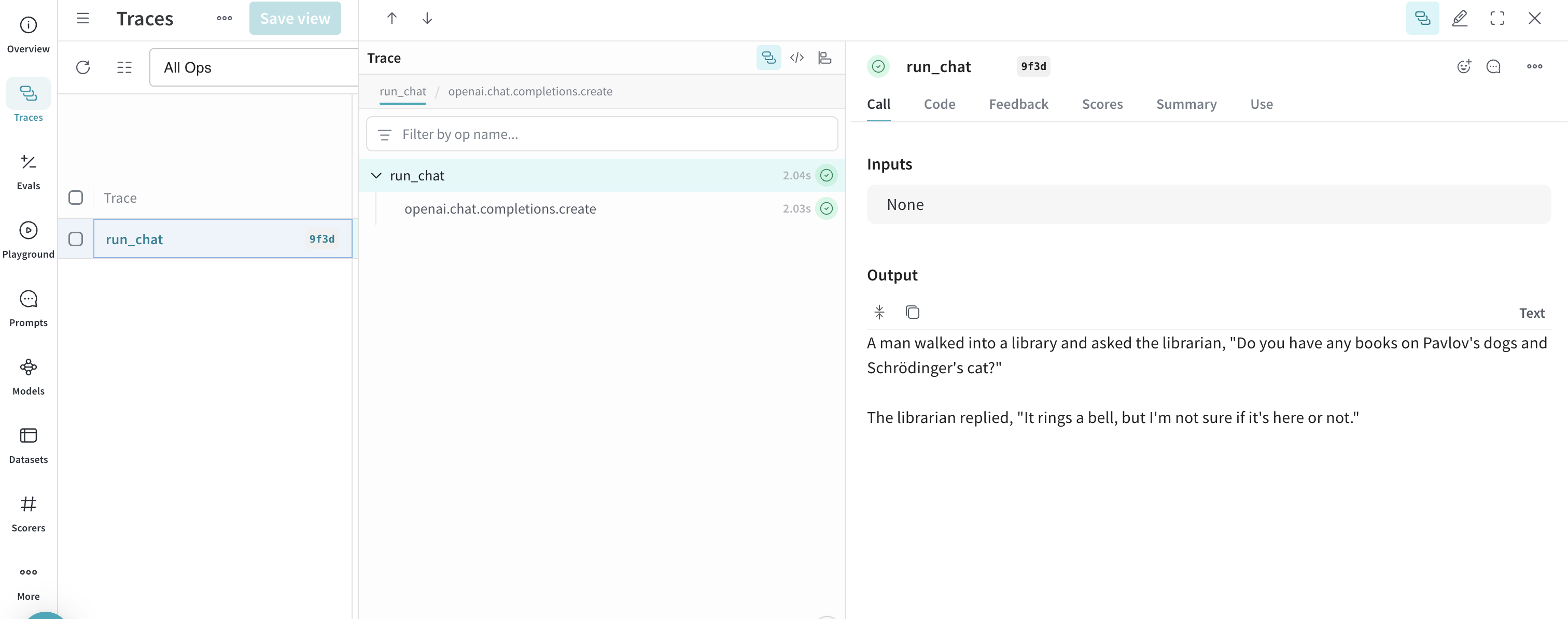
* The result is printed in the terminal, and the trace appears in your **Traces** tab at [https://wandb.ai](https://wandb.ai) under the specified project.
To use this example, you must complete the [general prerequisites](#prerequisites) and [Additional prerequisites for using the API via Python](#additional-prerequisites-for-using-the-api-via-python).
```python
import weave
import openai
# Set the Weave team and project for tracing
weave.init("/")
client = openai.OpenAI(
base_url='https://api.inference.wandb.ai/v1',
# Get your API key from https://wandb.ai/authorize
api_key="",
# Required for W&B inference usage tracking
project="wandb/inference-demo",
)
# Trace the model call in Weave
@weave.op()
def run_chat():
response = client.chat.completions.create(
model="meta-llama/Llama-3.1-8B-Instruct",
messages=[
{"role": "system", "content": "You are a helpful assistant."},
{"role": "user", "content": "Tell me a joke."}
],
)
return response.choices[0].message.content
# Run and log the traced call
output = run_chat()
print(output)
```
Once you run the code sample, you can view the trace in Weave by clicking the link printed in the terminal (e.g. `https://wandb.ai///r/call/01977f8f-839d-7dda-b0c2-27292ef0e04g`), or:
1. Navigate to [https://wandb.ai](https://wandb.ai).
2. Select the **Traces** tab to view your Weave traces.
Next, try the [advanced example](#advanced-example-use-weave-evaluations-and-leaderboards-with-the-inference-service).
### Advanced example: Use Weave Evaluations and Leaderboards with the inference service
In addition to using Weave with the Inference service to [trace model calls](../tracking/tracing.mdx), you can also [evaluate performance](../core-types/evaluations.mdx), and [publish a leaderboard](../core-types/leaderboards.mdx). The following Python code sample compares two models on a simple question–answer dataset.
To use this example, you must complete the [general prerequisites](#prerequisites) and [Additional prerequisites for using the API via Python](#additional-prerequisites-for-using-the-api-via-python).
```python
import os
import asyncio
import openai
import weave
from weave.flow import leaderboard
from weave.trace.ref_util import get_ref
# Set the Weave team and project for tracing
weave.init("/")
dataset = [
{"input": "What is 2 + 2?", "target": "4"},
{"input": "Name a primary color.", "target": "red"},
]
@weave.op
def exact_match(target: str, output: str) -> float:
return float(target.strip().lower() == output.strip().lower())
class WBInferenceModel(weave.Model):
model: str
@weave.op
def predict(self, prompt: str) -> str:
client = openai.OpenAI(
base_url="https://api.inference.wandb.ai/v1",
# Get your API key from https://wandb.ai/authorize
api_key="",
# Required for W&B inference usage tracking
project="/",
)
resp = client.chat.completions.create(
model=self.model,
messages=[{"role": "user", "content": prompt}],
)
return resp.choices[0].message.content
llama = WBInferenceModel(model="meta-llama/Llama-3.1-8B-Instruct")
deepseek = WBInferenceModel(model="deepseek-ai/DeepSeek-V3-0324")
def preprocess_model_input(example):
return {"prompt": example["input"]}
evaluation = weave.Evaluation(
name="QA",
dataset=dataset,
scorers=[exact_match],
preprocess_model_input=preprocess_model_input,
)
async def run_eval():
await evaluation.evaluate(llama)
await evaluation.evaluate(deepseek)
asyncio.run(run_eval())
spec = leaderboard.Leaderboard(
name="Inference Leaderboard",
description="Compare models on a QA dataset",
columns=[
leaderboard.LeaderboardColumn(
evaluation_object_ref=get_ref(evaluation).uri(),
scorer_name="exact_match",
summary_metric_path="mean",
)
],
)
weave.publish(spec)
```
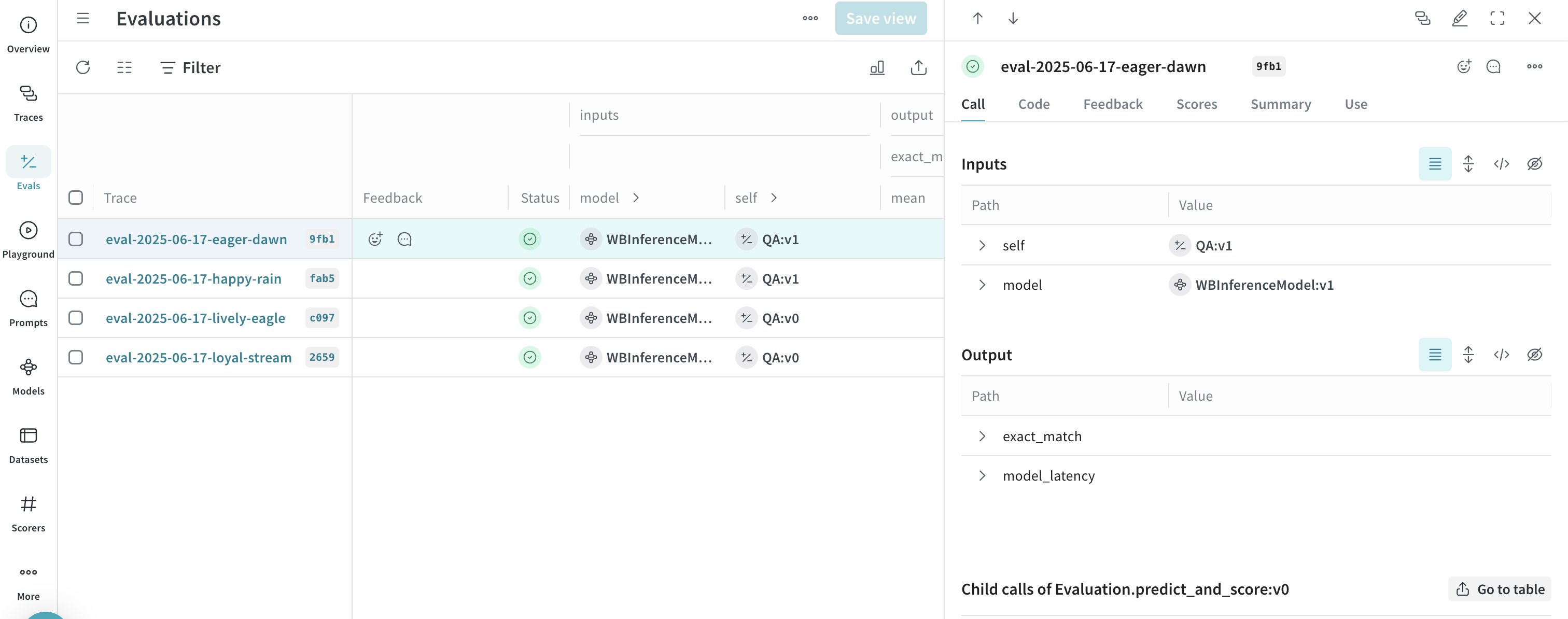
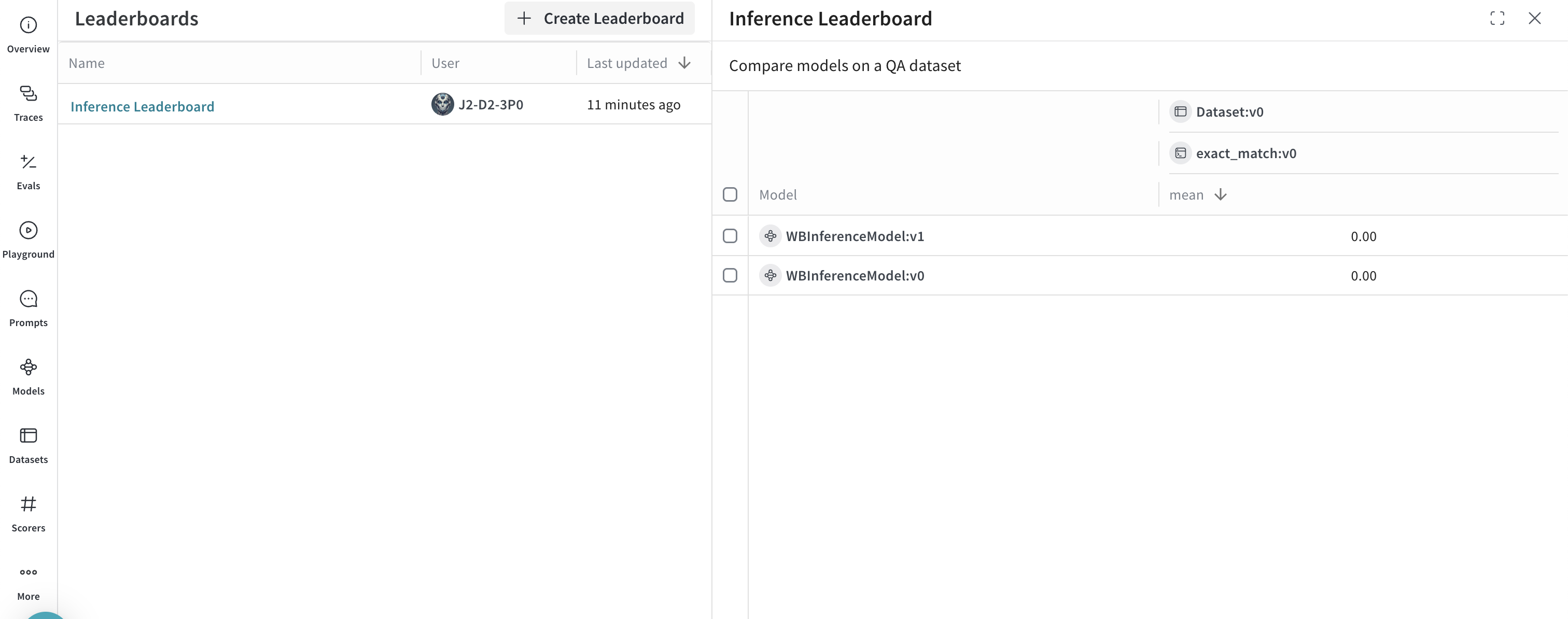
After you run the following code sample, navigate to your W\&B account at [https://wandb.ai/](https://wandb.ai/) and:
* Navigate to the **Traces** tab to [view your traces](../tracking/tracing.mdx)
* Navigate to the **Evals** tab to [view your model evaluations](../core-types/evaluations.mdx)
* Navigate to the **Leaders** tab to [view the generated leaderboard](../core-types/leaderboards.mdx)
## UI
The following section describes how to use the Inference service from the W\&B UI. Before you can access the Inference service via the UI, complete the [prerequisites](#prerequisites).
### Access the Inference service
You can access the Inference service via the Weave UI from two different locations:
* [Direct link](#direct-link)
* [From the Inference tab](#from-the-inference-tab)
* [From the Playground tab](#from-the-playground-tab)
#### Direct link
Navigate to [https://wandb.ai/inference](https://wandb.ai/inference).
#### From the Inference tab
1. Navigate to your W\&B account at [https://wandb.ai/](https://wandb.ai/).
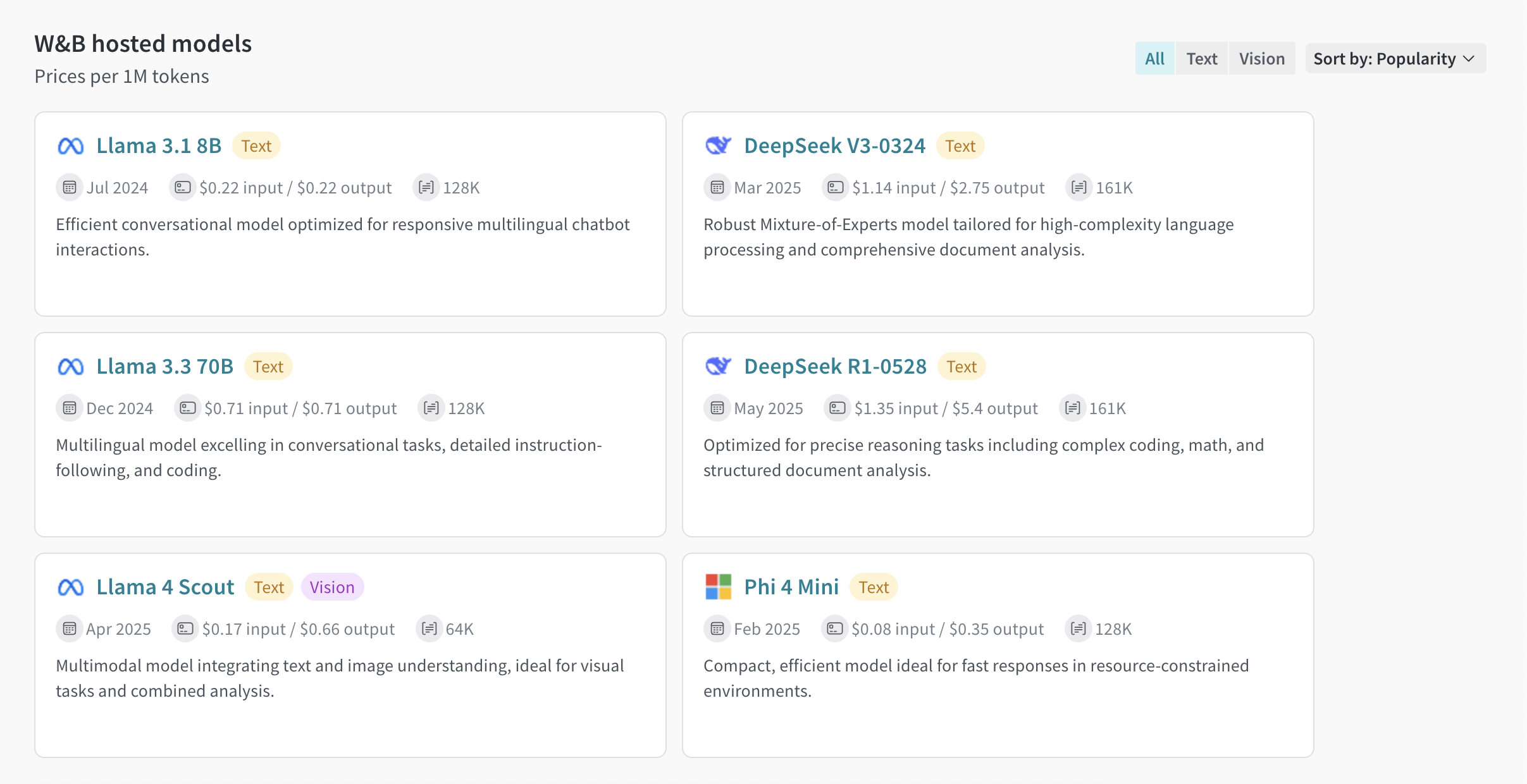
2. From the left sidebar, select **Inference**. A page with available models and model information displays.
#### From the Playground tab
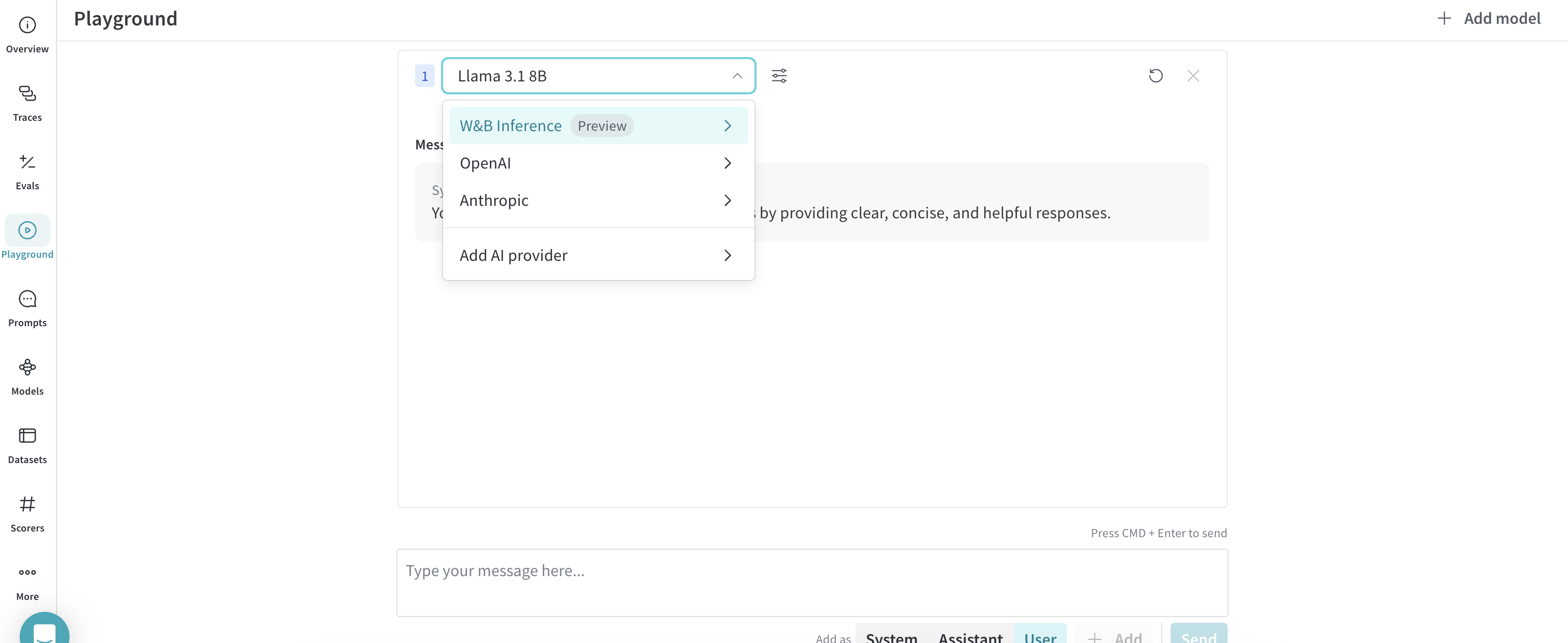
1. From the left sidebar, select **Playground**. The Playground chat UI displays.
2. From the LLM dropdown list, mouseover **W\&B Inference**. A dropdown with available W\&B Inference models displays to the right.
3. From the W\&B Inference models dropdown, you can:
* Click the name of any available model to [try it in the Playground](#try-a-model-in-the-playground).
* [Compare one or more models in the Playground](#compare-multiple-models)
### Try a model in the Playground
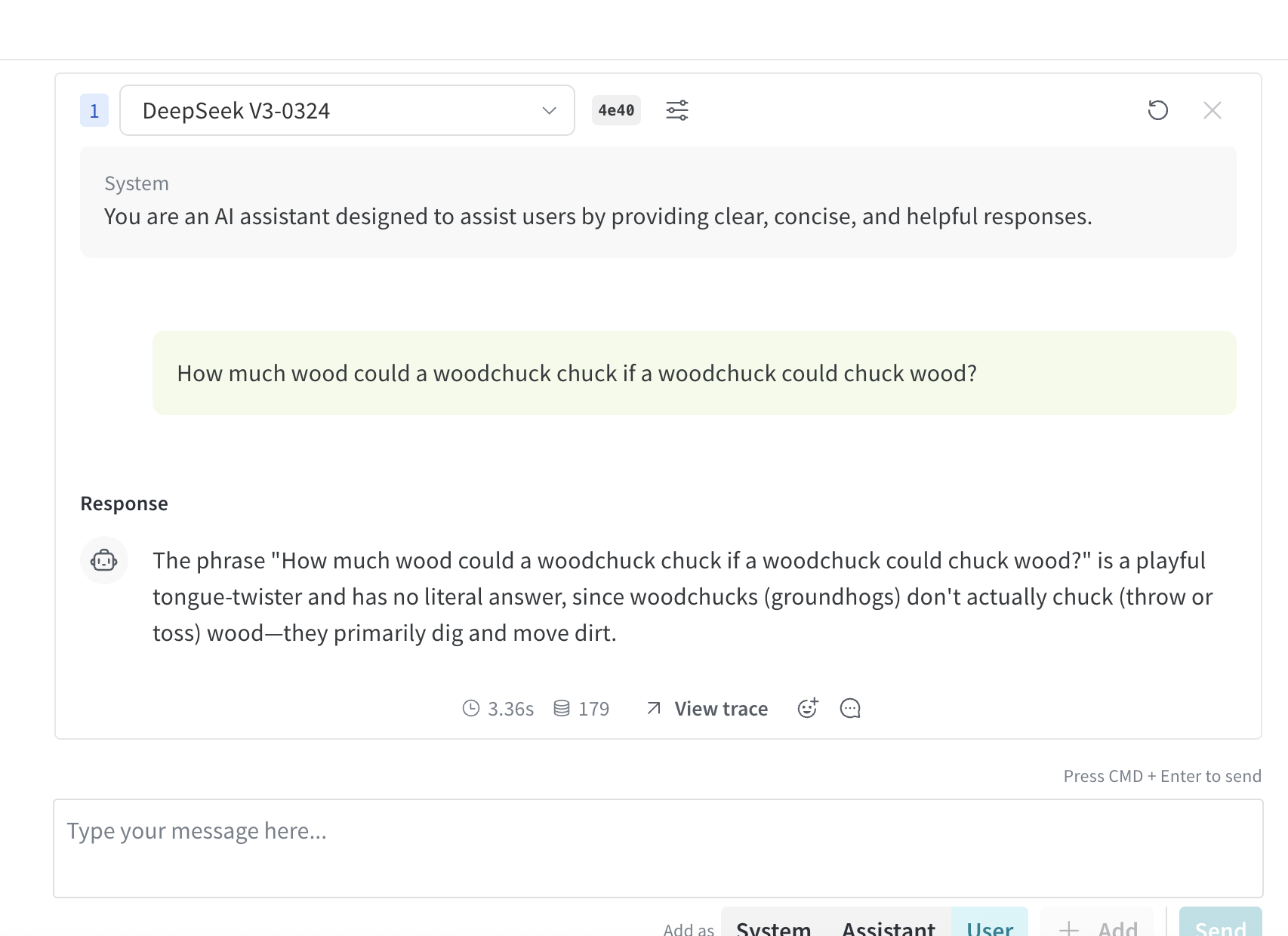
Once you've [selected a model using one of the access options](#access-the-inference-service), you can try the model in Playground. The following actions are available:
* [Customize model settings and parameters](../tools/playground.md#customize-settings)
* [Add, retry, edit, and delete messages](../tools/playground.md#message-controls)
* [Save and reuse a model with custom settings](../tools/playground.md#saved-models)
* [Compare multiple models](#compare-multiple-models)
### Compare multiple models
You can compare multiple Inference models in the Playground. The Compare view can be accessed from two different locations:
* [Access the Compare view from the Inference tab ](#access-the-compare-view-from-the-inference-tab)
* [Access the Compare view from the Playground tab](#access-the-compare-view-from-the-playground-tab)
#### Access the Compare view from the Inference tab
1. From the left sidebar, select **Inference**. A page with available models and model information displays.
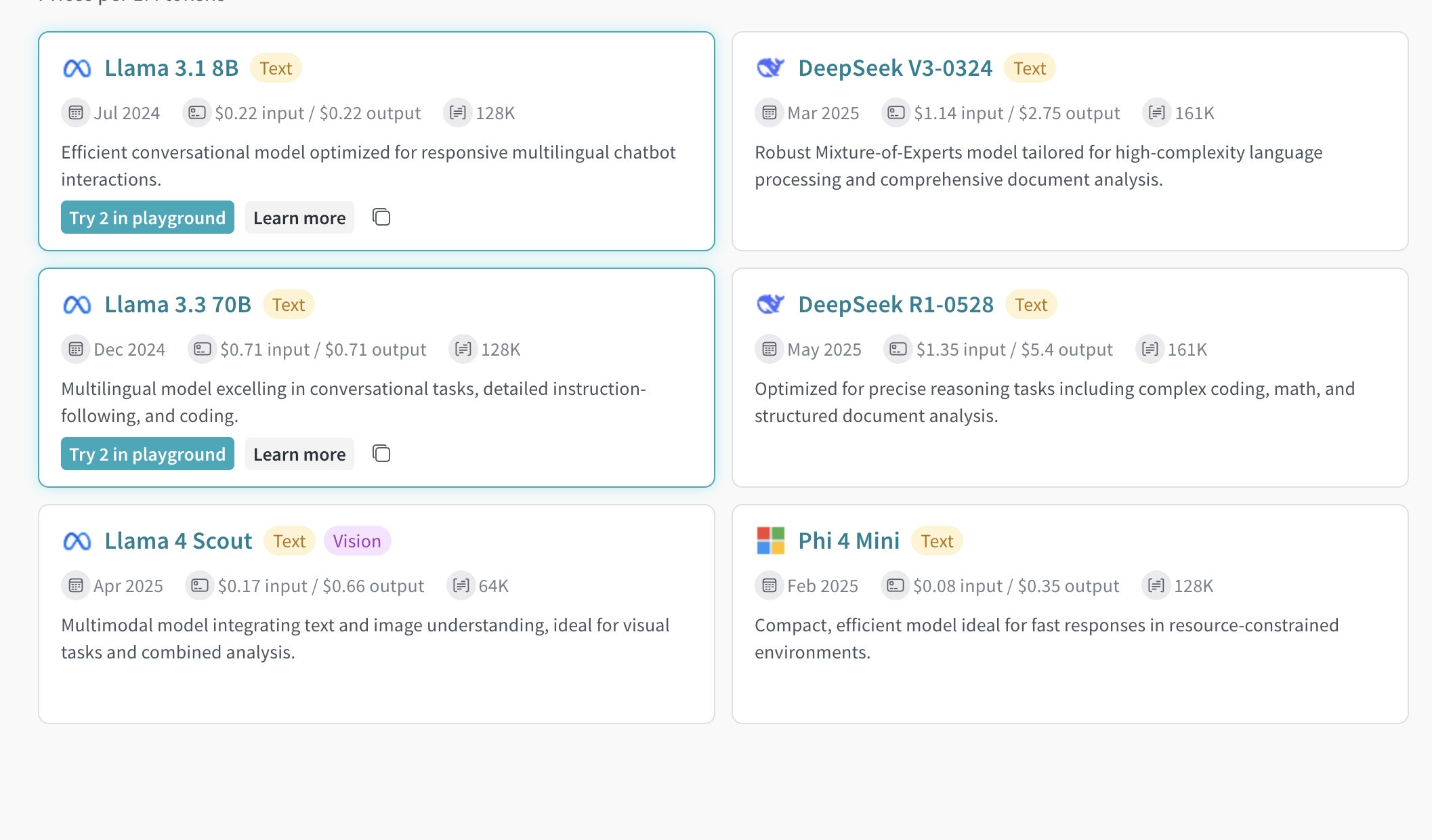
2. To select models for comparison, click anywhere on a model card (except for the model name). The border of the model card is highlighted in blue to indicate the selection.
3. Repeat step 2 for each model you want to compare.
4. In any of the selected cards, click the **Compare N models in the Playground** button (`N` is the number of models you are comparing. For example, when 3 models are selected, the button displays as **Compare 3 models in the Playground**). The comparison view opens.
Now, you can compare models in the Playground, and use any of the features described in [Try a model in the Playground](#try-a-model-in-the-playground).
#### Access the Compare view from the Playground tab
1. From the left sidebar, select **Playground**. The Playground chat UI displays.
2. From the LLM dropdown list, mouseover **W\&B Inference**. A dropdown with available W\&B Inference models displays to the right.
3. From the dropdown, select **Compare**. The **Inference** tab displays.
4. To select models for comparison, click anywhere on a model card (except for the model name). The border of the model card is highlighted in blue to indicate the selection.
5. Repeat step 4 for each model you want to compare.
6. In any of the selected cards, click the **Compare N models in the Playground** button (`N` is the number of models you are comparing. For example, when 3 models are selected, the button displays as **Compare 3 models in the Playground**). The comparison view opens.
Now, you can compare models in the Playground, and use any of the features described in [Try a model in the Playground](#try-a-model-in-the-playground).
### View billing and usage information
Organization admins can track current Inference credit balance, usage history, and upcoming billing (if applicable) directly from the W\&B UI:
1. In the W\&B UI, navigate to the W\&B **Billing** page.
2. In the bottom righthand corner, the Inference billing information card is displayed. From here, you can:
* Click the **View usage** button in the Inference billing information card to view your usage over time.
* If you're on a paid plan, view your upcoming inference charges.
Visit the [Inference pricing page for a breakdown of per-model pricing](https://wandb.ai/site/pricing/inference)
## Usage information and limits
The following section describes important usage information and limits. Familiarize yourself with this information before using the service.
### Geographic restrictions
The Inference service is only accessible from supported geographic locations. For more information, see the [Terms of Service](https://docs.coreweave.com/docs/policies/terms-of-service/terms-of-use#geographic-restrictions).
### Concurrency limits
To ensure fair usage and stable performance, the W\&B Inference API enforces rate limits at the user and project level. These limits help:
* Prevent misuse and protect API stability
* Ensure access for all users
* Manage infrastructure load effectively
If a rate limit is exceeded, the API will return a `429 Concurrency limit reached for requests` response. To resolve this error, reduce the number of concurrent requests.
### Pricing
For model pricing information, visit [https://wandb.ai/site/pricing/inference](https://wandb.ai/site/pricing/inference).
## API errors
| Error Code | Message | Cause | Solution |
| ---------- | --------------------------------------------------------------------------- | ----------------------------------------------------------------------------------------- | --------------------------------------------------------------------------------------------------- |
| 401 | Invalid Authentication | Invalid authentication credentials or your W\&B project entity and/or name are incorrect. | Ensure the correct API key is being used and/or that your W\&B project name and entity are correct. |
| 403 | Country, region, or territory not supported | Accessing the API from an unsupported location. | Please see [Geographic restrictions](#geographic-restrictions) |
| 429 | Concurrency limit reached for requests | Too many concurrent requests. | Reduce the number of concurrent requests. |
| 429 | You exceeded your current quota, please check your plan and billing details | Out of credits or reached monthly spending cap. | Purchase more credits or increase your limits. |
| 500 | The server had an error while processing your request | Internal server error. | Retry after a brief wait and contact support if it persists. |
| 503 | The engine is currently overloaded, please try again later | Server is experiencing high traffic. | Retry your request after a short delay. |