> ## Documentation Index
> Fetch the complete documentation index at: https://wb-21fd5541-feature-automate-reference-docs-generation.mintlify.site/llms.txt
> Use this file to discover all available pages before exploring further.
# W&B Weave Self-Managed
> Deploy and manage Weave on your own infrastructure
Weave on self-managed infrastructure is currently in Private Preview.
For production environments, W\&B strongly recommends using [W\&B Dedicated Cloud](https://docs.wandb.ai/guides/hosting/hosting-options/dedicated_cloud), where Weave is Generally Available.
To deploy a production-grade, self-managed instance, contact `support@wandb.com`.
This guide explains how to deploy all the components required to run W\&B Weave in a self-managed environment.
A key component of a self-managed Weave deployment is [ClickHouseDB](https://clickhouse.com/), which the Weave application backend relies on.
Although the deployment process sets up a fully functional ClickHouseDB instance, you may need to take additional steps to ensure reliability and high availability for a production-ready environment.
## Requirements
* W\&B Platform installed. For more information, see the [Self-Managed Deployment Guide](https://docs.wandb.ai/guides/hosting/hosting-options/self-managed/).
* [Bitnami's ClickHouse Helm Chart](https://github.com/bitnami/charts/tree/main/bitnami/clickhouse).
* An S3 bucket pre-configured for ClickHouse storage. For configuration details, see [Provide S3 Credentials](#provide-s3-credentials).
* Kubernetes Cluster Nodes with the following specifications:
* CPU: 8 cores
* RAM: 64 GB
* Disk: 200GB+
* A Weave-enabled license from W\&B. To request a license, please contact `support@wandb.com`.
For a detailed reference architecture, see [https://docs.wandb.ai/guides/hosting/self-managed/ref-arch/](https://docs.wandb.ai/guides/hosting/self-managed/ref-arch/#models-and-weave).
## 1. Configure ClickHouse
The ClickHouse deployment in this document uses the [Bitnami ClickHouse](https://bitnami.com/stack/clickhouse) package.
The Bitnami Helm chart provides good support for basic ClickHouse functionalities, particularly the use of [ClickHouse Keeper](https://clickhouse.com/docs/en/guides/sre/keeper/clickhouse-keeper).
To configure Clickhouse, complete the following steps:
1. [Configure the Helm repository](#configure-helm-repository)
2. [Create Helm Configuration](#create-helm-configuration)
3. [Provide S3 credentials](#provide-s3-credentials)
### Configure Helm repository
1. Add the Bitnami Helm repository:
`helm repo add bitnami https://charts.bitnami.com/bitnami`
2. Update the repository:
`helm repo update`
### Create Helm Configuration
The most critical part of the Helm configuration is the ClickHouse configuration, which is provided in XML format. Below is an example `values.yaml` file with customizable parameters to suit your needs.
To make the configuration process easier, we have added comments in the relevant sections using the format `{/* COMMENT */}`.
Modify the following parameters:
* `clusterName`
* `auth.username`
* `auth.password`
* S3 bucket-related configurations
W\&B recommends keeping the `clusterName` value in `values.yaml` set to `weave_cluster`. This is the expected cluster name when W\&B Weave runs the database migration. If you need to use a different name, see the [Setting `clusterName`](#setting-clustername) section for more information.
```yaml
## @param clusterName ClickHouse cluster name
clusterName: weave_cluster
## @param shards Number of ClickHouse shards to deploy
shards: 1
## @param replicaCount Number of ClickHouse replicas per shard to deploy
## if keeper enable, same as keeper count, keeper cluster by shards.
replicaCount: 3
persistence:
enabled: true
size: 30G # this size must be larger than cache size.
## ClickHouse resource requests and limits
resources:
requests:
cpu: 0.5
memory: 500Mi
limits:
cpu: 3.0
memory: 6Gi
## Authentication
auth:
username: weave_admin
password: "weave_123"
existingSecret: ""
existingSecretKey: ""
## @param logLevel Logging level
logLevel: information
## @section ClickHouse keeper configuration parameters
keeper:
enabled: true
## @param extraEnvVars Array with extra environment variables to add to ClickHouse nodes
##
extraEnvVars:
- name: S3_ENDPOINT
value: "https://s3.us-east-1.amazonaws.com/bucketname/$(CLICKHOUSE_REPLICA_ID)"
## @param defaultConfigurationOverrides [string] Default configuration overrides (evaluated as a template)
defaultConfigurationOverrides: |
{/* Macros */}
{/* Log Level */}
{{ .Values.logLevel }}
{{- if or (ne (int .Values.shards) 1) (ne (int .Values.replicaCount) 1)}}
<{{ .Values.clusterName }}>
{{- $shards := $.Values.shards | int }}
{{- range $shard, $e := until $shards }}
true
{{- $replicas := $.Values.replicaCount | int }}
{{- range $i, $_e := until $replicas }}
{{ printf "%s-shard%d-%d.%s.%s.svc.%s" (include "common.names.fullname" $ ) $shard $i (include "clickhouse.headlessServiceName" $) (include "common.names.namespace" $) $.Values.clusterDomain }}
{{ $.Values.service.ports.tcp }}
{{- end }}
{{- end }}
{{- end }}
{{- if .Values.keeper.enabled }}
{{ $.Values.containerPorts.keeper }}
{{- if .Values.tls.enabled }}
{{ $.Values.containerPorts.keeperSecure }}
{{- end }}
/bitnami/clickhouse/keeper/coordination/log
/bitnami/clickhouse/keeper/coordination/snapshots
10000
30000
trace
{{- $nodes := .Values.replicaCount | int }}
{{- range $node, $e := until $nodes }}
{{ $node | int }}
{{ $.Values.service.ports.keeperInter }}
{{- end }}
{{- end }}
{{- if or .Values.keeper.enabled .Values.zookeeper.enabled .Values.externalZookeeper.servers }}
{{- if or .Values.keeper.enabled }}
{{- $nodes := .Values.replicaCount | int }}
{{- range $node, $e := until $nodes }}
{{ $.Values.service.ports.keeper }}
{{- end }}
{{- else if .Values.zookeeper.enabled }}
{{- $nodes := .Values.zookeeper.replicaCount | int }}
{{- range $node, $e := until $nodes }}
{{ $.Values.zookeeper.service.ports.client }}
{{- end }}
{{- else if .Values.externalZookeeper.servers }}
{{- range $node :=.Values.externalZookeeper.servers }}
{{ $node }}
{{ $.Values.externalZookeeper.port }}
{{- end }}
{{- end }}
{{- end }}
{{- if .Values.metrics.enabled }}
/metrics
true
true
true
{{- end }}
0.0.0.0
::
1
s3
{/* AVOID USE CREDENTIALS CHECK THE RECOMMENDATION */}
xxx
xxx
{/* AVOID USE CREDENTIALS CHECK THE RECOMMENDATION */}
/var/lib/clickhouse/disks/s3_disk/
cache
s3_disk
/var/lib/clickhouse/s3_disk_cache/cache/
{/* THE CACHE SIZE MUST BE LOWER THAN PERSISTENT VOLUME */}
20Gi
s3_disk_cache
s3_main
## @section Zookeeper subchart parameters
zookeeper:
enabled: false
```
### S3 endpoint configuration
The bucket endpoint must be set as an environment variable to ensure each ClickHouse replica read and writes data in it's folder in the bucket.
```
extraEnvVars:
- name: S3_ENDPOINT
value: "https://s3.us-east-1.amazonaws.com/bucketname/$(CLICKHOUSE_REPLICA_ID)"
```
Do not remove the `$(CLICKHOUSE_REPLICA_ID)` from the bucket endpoint configuration. It will ensure each ClickHouse replica is writing and reading data from it's folder in the bucket.
### Provide S3 credentials
You can specify credentials for accessing an S3 bucket by either hardcoding the configuration, or having ClickHouse fetch the data from environment variables or an EC2 instance.
#### Hardcode the configuration
Directly include the credentials in the storage configuration:
```plaintext
s3
xxx
xxx
```
#### Use environment variables or EC2 Metadata
Instead of hardcoding credentials, you can enable ClickHouse to fetch them dynamically from environment variables or Amazon EC2 instance metadata.
```plaintext
true
```
You can find more details on this at [ClickHouse: Separation of Storage and Compute](https://clickhouse.com/docs/en/guides/separation-storage-compute).
## 2. Install and deploy ClickHouse
With the repositories set up and the `values.yaml` file prepared, the next step is to install ClickHouse.
```bash
helm install clickhouse bitnami/clickhouse -f values.yaml --version 8.0.10
```
Ensure you're using the version `8.0.10`. The latest chart version (`9.0.0`) doesn't work with the configuration proposed in this document.
## 3. Confirm ClickHouse deployment
Confirm that ClickHouse is deployed using the following command:
```bash
kubectl get pods
```
You should see the following pods:
```bash
NAME READY STATUS RESTARTS AGE
clickhouse-shard0-0 1/1 Running 0 9m59s
clickhouse-shard0-1 1/1 Running 0 10m
clickhouse-shard0-2 1/1 Running 0 10m
```
## 4. Deploy Weave
Weave is already available for automatic deployment via [W\&B Operator](https://docs.wandb.ai/guides/hosting/operator/#wb-kubernetes-operator). With the W\&B Platform installed, complete the following steps:
1. Edit the [CR instance](https://docs.wandb.ai/guides/hosting/operator/#complete-example) used to deploy the platform.
2. Add the Weave configuration.
## 5. Gather information
1. Use Kubernetes service details to configure Weave tracing:
* **Endpoint**: `-headless..svc.cluster.local`
* Replace `` with your Helm release name
* Replace `` with your `NAMESPACE`
* Get the service details: `kubectl get svc -n `
* **Username**: Set in the `values.yaml`
* **Password**: Set in the `values.yaml`
2. With this information, update the W\&B Platform Custom Resource(CR) by adding the following configuration:
```yaml
apiVersion: apps.wandb.com/v1
kind: WeightsAndBiases
metadata:
labels:
app.kubernetes.io/name: weightsandbiases
app.kubernetes.io/instance: wandb
name: wandb
namespace: default
spec:
values:
global:
[...]
clickhouse:
host: -headless..svc.cluster.local
port: 8123
password:
user:
database: wandb_weave
# `replicated` must be set to `true` if replicating data across multiple nodes
# This is in preview, use the env var `WF_CLICKHOUSE_REPLICATED`
replicated: true
weave-trace:
enabled: true
[...]
weave-trace:
install: true
extraEnv:
WF_CLICKHOUSE_REPLICATED: "true"
[...]
```
When using more than one replica (W\&B recommend a least 3 replicas), ensure to have the following environment variable set for Weave Traces.
```
extraEnv:
WF_CLICKHOUSE_REPLICATED: "true"
```
This has the same effect of `replicated: true` which in preview.
3. Set the `clusterName` in `values.yaml` to `weave_cluster`. If it is not, the database migration will fail.
Alternatively, ff you use a different cluster name, set the `WF_CLICKHOUSE_REPLICATED_CLUSTER` environment variable in `weave-trace.extraEnv` to match the chosen name, as shown in the example below.
```yaml
[...]
clickhouse:
host: -headless..svc.cluster.local
port: 8123
password:
user:
database: wandb_weave
# `replicated` must be set to `true` if replicating data across multiple nodes
# This is in preview, use the env var `WF_CLICKHOUSE_REPLICATED`
replicated: true
weave-trace:
enabled: true
[...]
weave-trace:
install: true
extraEnv:
WF_CLICKHOUSE_REPLICATED: "true"
WF_CLICKHOUSE_REPLICATED_CLUSTER: "different_cluster_name"
[...]
```
The final configuration will look like the following example:
```yaml
apiVersion: apps.wandb.com/v1
kind: WeightsAndBiases
metadata:
labels:
app.kubernetes.io/name: weightsandbiases
app.kubernetes.io/instance: wandb
name: wandb
namespace: default
spec:
values:
global:
license: eyJhbGnUzaHgyQjQyQWhEU3...ZieKQ2x5GGfw
host: https://wandb.example.com
bucket:
name: abc-wandb-moving-pipefish
provider: gcs
mysql:
database: wandb_local
host: 10.218.0.2
name: wandb_local
password: 8wtX6cJHizAZvYScjDzZcUarK4zZGjpV
port: 3306
user: wandb
clickhouse:
host: -headless..svc.cluster.local
port: 8123
password:
user:
database: wandb_weave
# This option must be true if replicating data across multiple nodes
replicated: true
weave-trace:
enabled: true
ingress:
annotations:
ingress.gcp.kubernetes.io/pre-shared-cert: abc-wandb-cert-creative-puma
kubernetes.io/ingress.class: gce
kubernetes.io/ingress.global-static-ip-name: abc-wandb-operator-address
weave-trace:
install: true
extraEnv:
WF_CLICKHOUSE_REPLICATED: "true"
```
4. With the Custom Resource (CR) prepared, apply the new configuration:
```bash
kubectl apply -f wandb.yaml
```
## 6. Access Weave
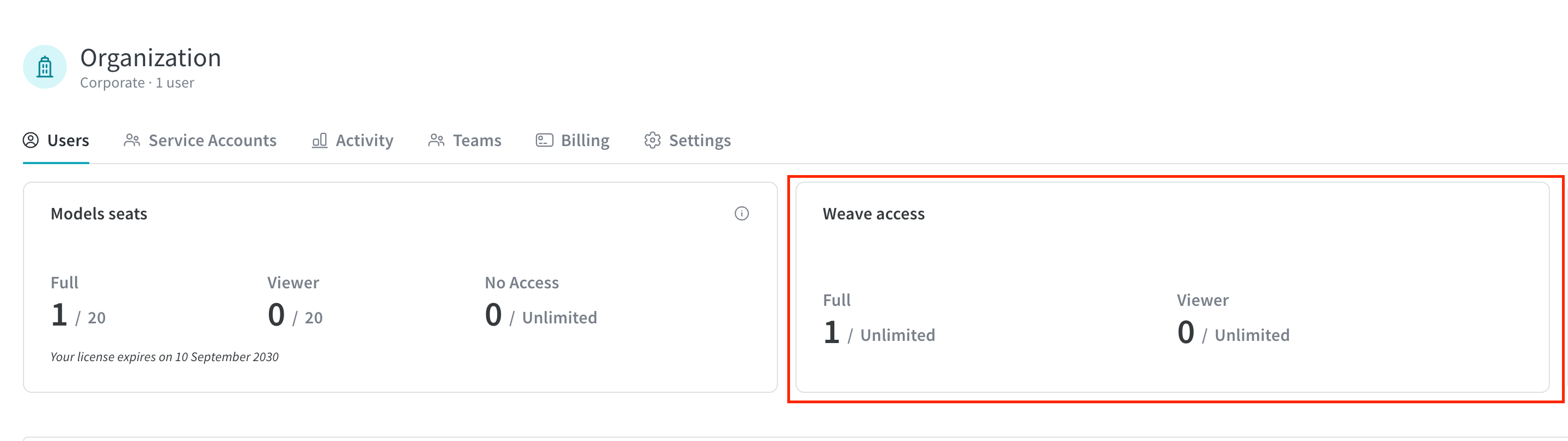
Once the deployment is running, accessing the W\&B endpoint configured in the `host` option should display the Weave licensing status as enabled.