> ## Documentation Index
> Fetch the complete documentation index at: https://wb-21fd5541-feature-automate-reference-docs-generation.mintlify.site/llms.txt
> Use this file to discover all available pages before exploring further.
# Track LLM inputs & outputs
> Follow these steps to track your first call
Try the new W\&B Inference service free. It gives you access to AI models through an API and the Weave Playground.
* [Developer docs](./guides/integrations/inference)
* [Product page](https://wandb.ai/site/inference)
Follow these steps to track your first call. You can also  ## 1. Install Weave and get your API key
**Install weave**
First, install the weave library:
```bash Python
pip install weave
```
```bash TypeScript
pnpm install weave
```
**Get your API key**
Create a W\&B account at [https://wandb.ai](https://wandb.ai). Then copy your API key from [https://wandb.ai/authorize](https://wandb.ai/authorize).
## 2. Log a trace to a new project
Follow these steps to track your first project:
* Import the `weave` library
* Call `weave.init('project-name')` to start tracking
* The system asks for your API key if you haven't logged in yet
* To log to a team, use `team-name/project-name`
* Set the `WANDB_API_KEY` environment variable to skip the login prompt
* Add `@weave.op()` to the functions you want to track
*This example uses OpenAI. You need an OpenAI [API key](https://platform.openai.com/docs/quickstart/step-2-setup-your-api-key).*
```python Python
import weave
from openai import OpenAI
client = OpenAI()
# Weave tracks the inputs, outputs and code of this function
@weave.op()
def extract_dinos(sentence):
response = client.chat.completions.create(
model="gpt-4o",
messages=[
{
"role": "system",
"content": """Extract dinosaurs from the text. Return JSON with:
- dinosaurs: list of dinosaurs
- name: scientific name
- common_name: nickname
- diet: herbivore or carnivore."""
},
{
"role": "user",
"content": sentence
}
],
response_format={ "type": "json_object" }
)
return response.choices[0].message.content
# Start the weave project
weave.init('jurassic-park')
sentence = """I saw a T. rex chase a Triceratops.
The T. rex eats meat. The Triceratops eats plants.
A Brachiosaurus ate leaves from tall trees nearby."""
result = extract_dinos(sentence)
print(result)
```
```typescript TypeScript
import OpenAI from 'openai';
import * as weave from 'weave';
const openai = new OpenAI();
async function extractDinos(input) {
const response = await openai.chat.completions.create({
model: 'gpt-4o',
messages: [
{
role: 'user',
content: `Extract dinosaurs from this text. Return JSON with name, common_name, and diet: ${input}`,
},
],
});
return response.choices[0].message.content;
}
const extractDinosOp = weave.op(extractDinos);
async function main() {
await weave.init('examples');
const result = await extractDinosOp(
'I saw a T. rex chase a Triceratops. The T. rex eats meat. The Triceratops eats plants. A Brachiosaurus ate leaves from tall trees nearby.'
);
console.log(result);
}
main();
```
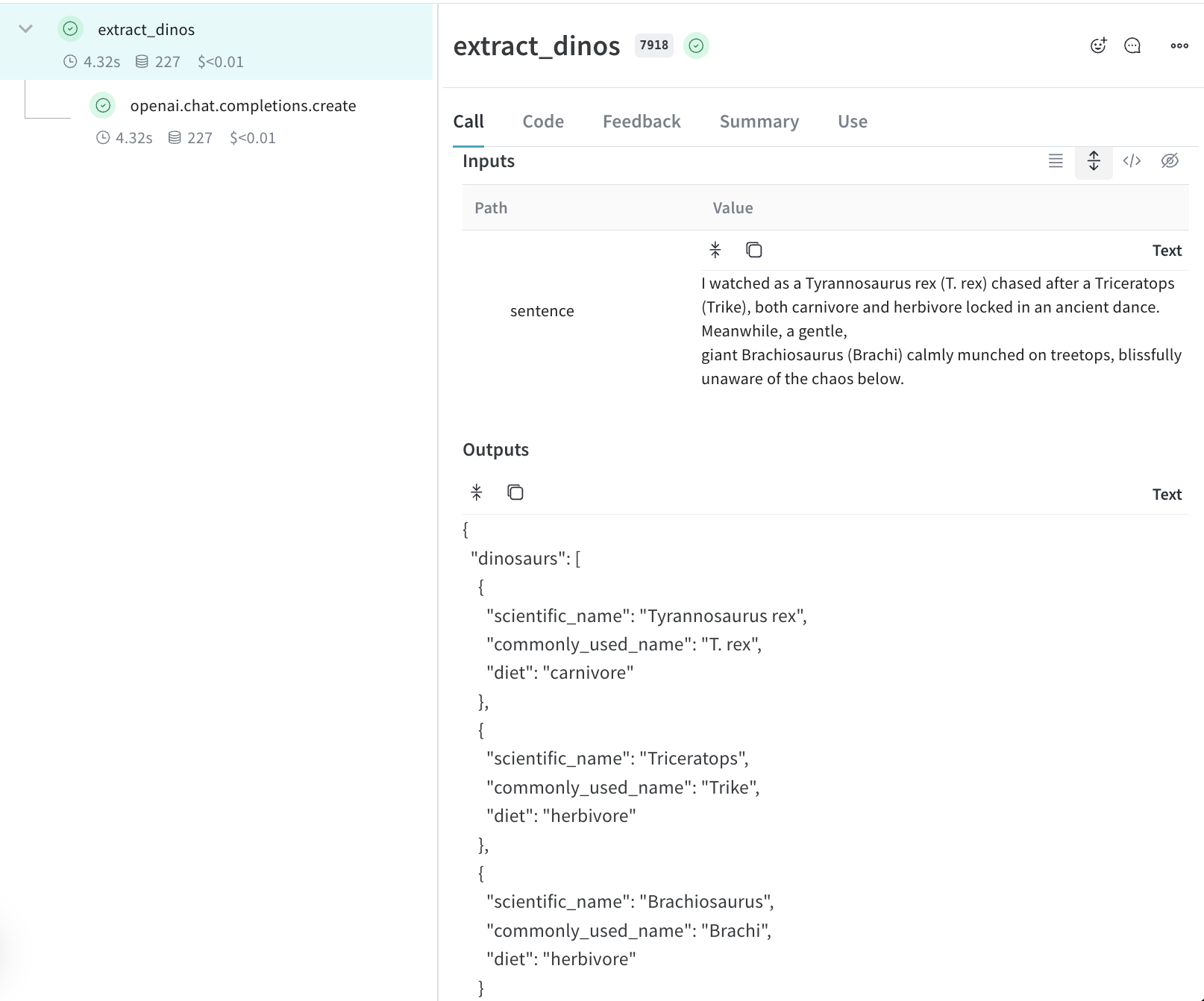
When you call `extract_dinos`, Weave shows a link to view your trace.
## 3. Automatic AI library logging
Weave tracks calls to many AI services:
* OpenAI
* Anthropic
* [Many more AI libraries](./guides/integrations/index)
Weave logs:
* AI model info
* Token usage
* Cost
To track other AI tools, wrap them with `@weave.op()`.
## 4. See traces in your project
Great job. Now Weave captures data every time you call your function. It also tracks code changes.
## Next steps
* Learn to [track data flow](./tutorial-tracing_2) in your app
* Read about [Tracing](./guides/tracking/tracing) to see how Weave works
* Check out [Integrations](./guides/integrations/index) for all AI providers
* Try the [Playground](./guides/tools/playground) to test different models
## 1. Install Weave and get your API key
**Install weave**
First, install the weave library:
```bash Python
pip install weave
```
```bash TypeScript
pnpm install weave
```
**Get your API key**
Create a W\&B account at [https://wandb.ai](https://wandb.ai). Then copy your API key from [https://wandb.ai/authorize](https://wandb.ai/authorize).
## 2. Log a trace to a new project
Follow these steps to track your first project:
* Import the `weave` library
* Call `weave.init('project-name')` to start tracking
* The system asks for your API key if you haven't logged in yet
* To log to a team, use `team-name/project-name`
* Set the `WANDB_API_KEY` environment variable to skip the login prompt
* Add `@weave.op()` to the functions you want to track
*This example uses OpenAI. You need an OpenAI [API key](https://platform.openai.com/docs/quickstart/step-2-setup-your-api-key).*
```python Python
import weave
from openai import OpenAI
client = OpenAI()
# Weave tracks the inputs, outputs and code of this function
@weave.op()
def extract_dinos(sentence):
response = client.chat.completions.create(
model="gpt-4o",
messages=[
{
"role": "system",
"content": """Extract dinosaurs from the text. Return JSON with:
- dinosaurs: list of dinosaurs
- name: scientific name
- common_name: nickname
- diet: herbivore or carnivore."""
},
{
"role": "user",
"content": sentence
}
],
response_format={ "type": "json_object" }
)
return response.choices[0].message.content
# Start the weave project
weave.init('jurassic-park')
sentence = """I saw a T. rex chase a Triceratops.
The T. rex eats meat. The Triceratops eats plants.
A Brachiosaurus ate leaves from tall trees nearby."""
result = extract_dinos(sentence)
print(result)
```
```typescript TypeScript
import OpenAI from 'openai';
import * as weave from 'weave';
const openai = new OpenAI();
async function extractDinos(input) {
const response = await openai.chat.completions.create({
model: 'gpt-4o',
messages: [
{
role: 'user',
content: `Extract dinosaurs from this text. Return JSON with name, common_name, and diet: ${input}`,
},
],
});
return response.choices[0].message.content;
}
const extractDinosOp = weave.op(extractDinos);
async function main() {
await weave.init('examples');
const result = await extractDinosOp(
'I saw a T. rex chase a Triceratops. The T. rex eats meat. The Triceratops eats plants. A Brachiosaurus ate leaves from tall trees nearby.'
);
console.log(result);
}
main();
```
When you call `extract_dinos`, Weave shows a link to view your trace.
## 3. Automatic AI library logging
Weave tracks calls to many AI services:
* OpenAI
* Anthropic
* [Many more AI libraries](./guides/integrations/index)
Weave logs:
* AI model info
* Token usage
* Cost
To track other AI tools, wrap them with `@weave.op()`.
## 4. See traces in your project
Great job. Now Weave captures data every time you call your function. It also tracks code changes.

## Next steps
* Learn to [track data flow](./tutorial-tracing_2) in your app
* Read about [Tracing](./guides/tracking/tracing) to see how Weave works
* Check out [Integrations](./guides/integrations/index) for all AI providers
* Try the [Playground](./guides/tools/playground) to test different models