Trace PydanticAI agent and tool calls in Weave using OpenTelemetry
You can trace PydanticAI agent and tool calls in Weave using OpenTelemetry (OTEL). PydanticAI is a Python agent framework built by the Pydantic team to make it easy and type-safe to build production-grade applications with Generative AI. It uses OTEL for tracing all agent and tool calls.
This guide shows you how to trace PydanticAI agent and tool calls using OTEL and visualize those traces in Weave. You’ll learn how to install the required dependencies, configure an OTEL tracer to send data to Weave, and instrument your PydanticAI agents and tools. You’ll also see how to enable tracing by default across all agents in your application.
It is recommended that you store sensitive environment variables like your API key and project info in an environment file (e.g., .env), and load them using os.environ. This keeps your credentials secure and out of your codebase.
The following code snippet demonstrates how to configure an OTLP span exporter and tracer provider to send OTEL traces from a PydanticAI application to Weave.
import base64import osfrom opentelemetry.exporter.otlp.proto.http.trace_exporter import OTLPSpanExporterfrom opentelemetry.sdk import trace as trace_sdkfrom opentelemetry.sdk.trace.export import SimpleSpanProcessor# Load sensitive values from environment variablesWANDB_BASE_URL = "https://trace.wandb.ai"PROJECT_ID = os.environ.get("WANDB_PROJECT_ID") # Your W&B entity/project name e.g. "myteam/myproject"WANDB_API_KEY = os.environ.get("WANDB_API_KEY") # Your W&B API keyOTEL_EXPORTER_OTLP_ENDPOINT = f"{WANDB_BASE_URL}/otel/v1/traces"AUTH = base64.b64encode(f"api:{WANDB_API_KEY}".encode()).decode()OTEL_EXPORTER_OTLP_HEADERS = { "Authorization": f"Basic {AUTH}", "project_id": PROJECT_ID,}# Create the OTLP span exporter with endpoint and headersexporter = OTLPSpanExporter( endpoint=OTEL_EXPORTER_OTLP_ENDPOINT, headers=OTEL_EXPORTER_OTLP_HEADERS,)# Create a tracer provider and add the exportertracer_provider = trace_sdk.TracerProvider()tracer_provider.add_span_processor(SimpleSpanProcessor(exporter))
To trace your PydanticAI agents and send trace data to Weave, pass an InstrumentationSettings object configured with your tracer provider to the Agent constructor. This ensures that all agent and tool calls are traced according to your OTEL configuration.The following example shows how to create a simple agent with tracing enabled. The key step is setting the instrument argument when initializing the agent:
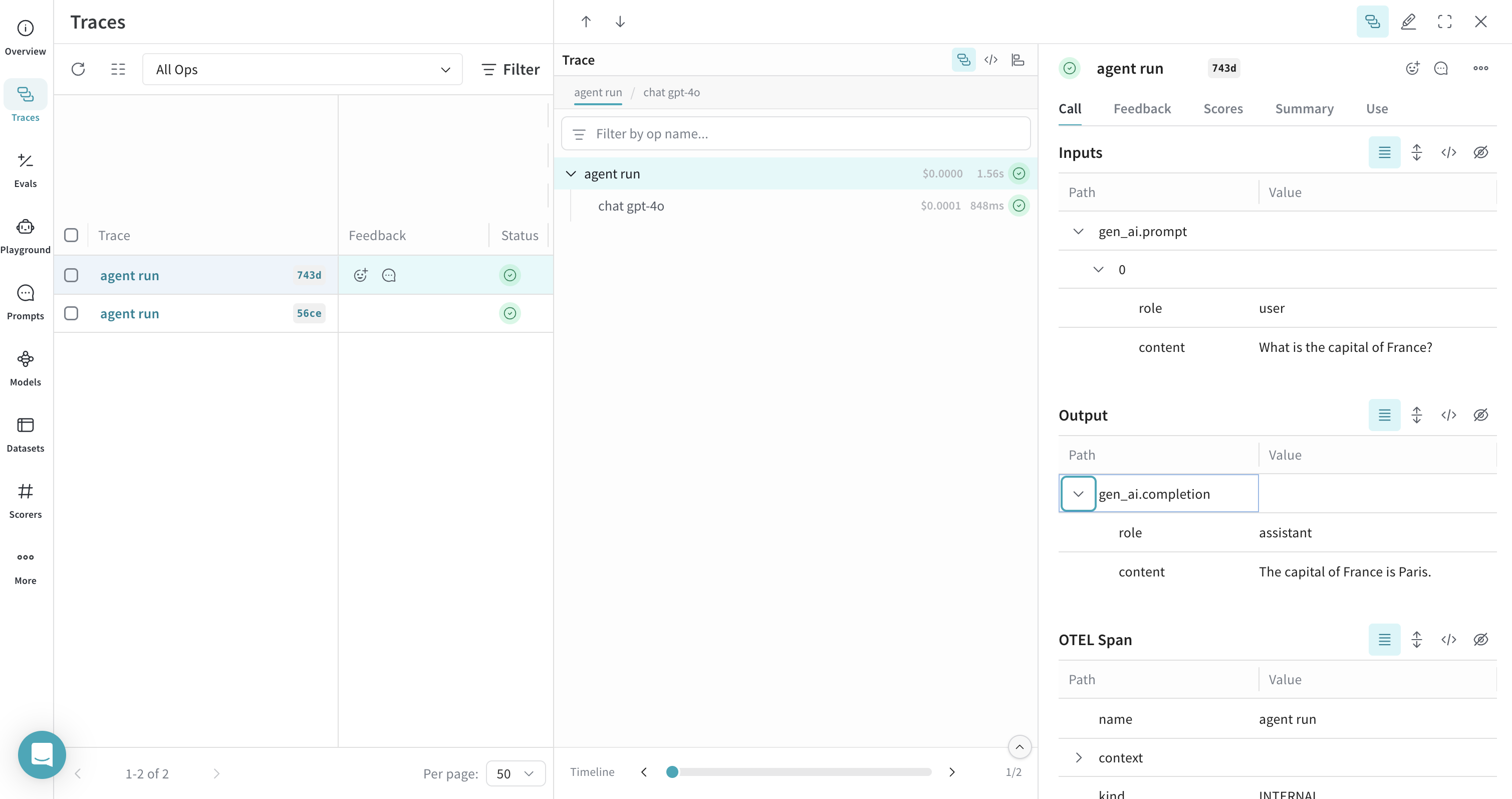
from pydantic_ai import Agentfrom pydantic_ai.models.instrumented import InstrumentationSettings# Create a PydanticAI agent with OTEL tracingagent = Agent( "openai:gpt-4o", instrument=InstrumentationSettings(tracer_provider=tracer_provider),)result = agent.run_sync("What is the capital of France?")print(result.output)
All calls to the agent are traced and sent to Weave.
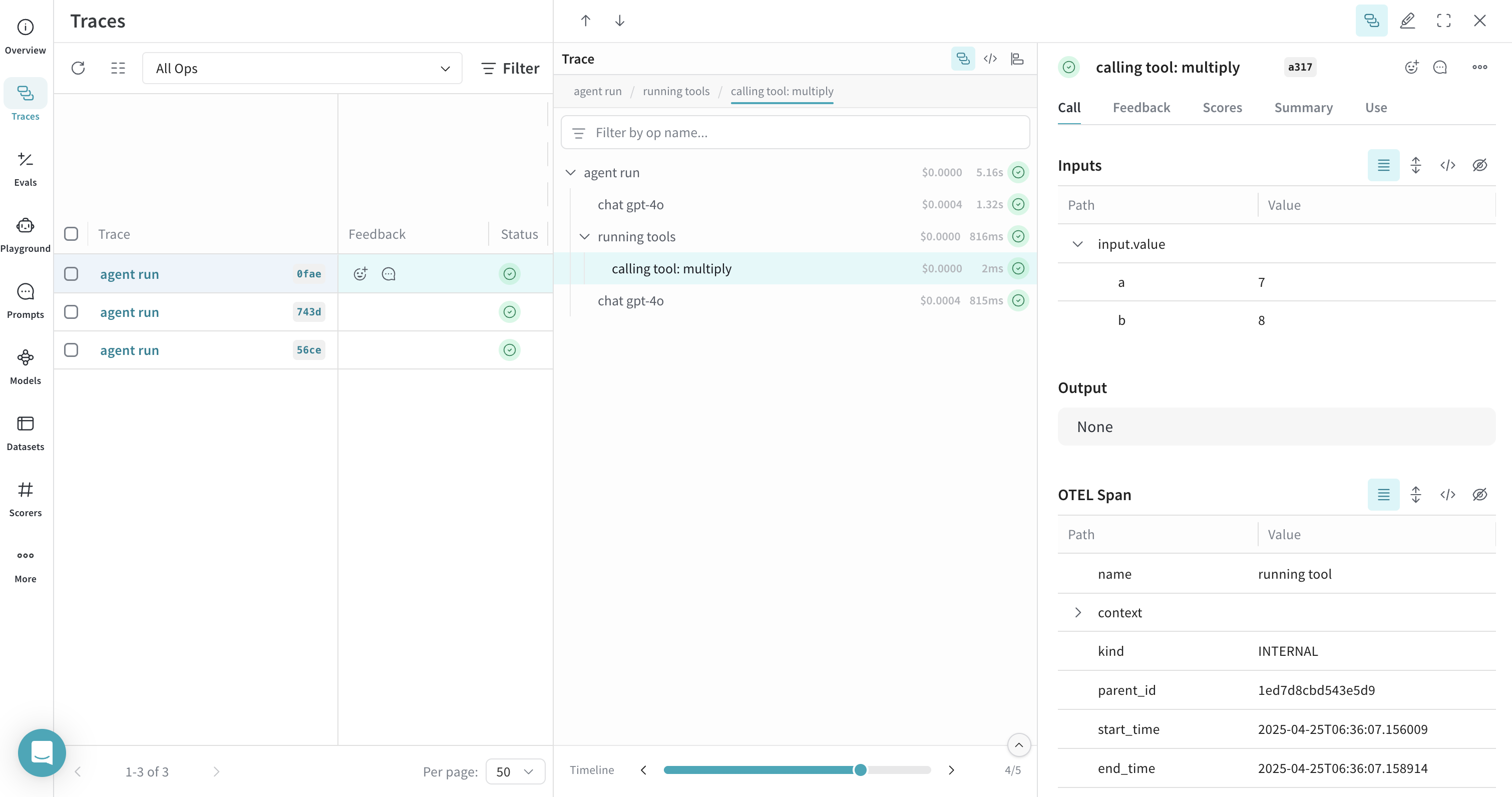
Weave can trace any PydanticAI operations that are instrumented with OTEL, including both agent and tool calls. This means that when your agent invokes a tool (e.g. a function decorated with @agent.tool_plain), the entire interaction is captured and visualized in Weave, including tool inputs, outputs, and the model’s reasoning.The following example shows how to create an agent with a system prompt and a tool. Tracing is enabled automatically for both the agent and the tool:
from pydantic_ai import Agentfrom pydantic_ai.models.instrumented import InstrumentationSettings# Create a PydanticAI agent with a system prompt and OTEL tracingagent = Agent( "openai:gpt-4o", system_prompt=( "You are a helpful assistant that can multiply numbers. " "When asked to multiply numbers, use the multiply tool." ), instrument=InstrumentationSettings(tracer_provider=tracer_provider),)# Define a tool@agent.tool_plaindef multiply(a: int, b: int) -> int: """Multiply two numbers.""" return a * b# Ask the agent to use the toolresult = agent.run_sync("What is 7 multiplied by 8?")print(result.output)
Both the agent call and the tool call are traced in Weave, allowing you to inspect the full reasoning and execution path of your application.
To apply OTEL tracing to all PydanticAI agents in your application, use the Agent.instrument_all() method. This sets a default InstrumentationSettings instance for any agent that doesn’t explicitly specify the instrument parameter.
from pydantic_ai import Agentfrom pydantic_ai.models.instrumented import InstrumentationSettings# Set up default instrumentation for all agentsAgent.instrument_all(InstrumentationSettings(tracer_provider=tracer_provider))# Now, any new agent will use this instrumentation by defaultagent1 = Agent("openai:gpt-4o")agent2 = Agent("openai:gpt-4o", system_prompt="Be helpful.")result = agent1.run_sync("What is the capital of France?")print(result.output)
This is useful for larger applications where you want consistent tracing across all agents without repeating configuration. For more details, see the PydanticAI OTEL docs.


 Both the agent call and the tool call are traced in Weave, allowing you to inspect the full reasoning and execution path of your application.