Documentation Index
Fetch the complete documentation index at: https://wb-21fd5541-feature-automate-reference-docs-generation.mintlify.app/llms.txt
Use this file to discover all available pages before exploring further.
Calls
CallsはWeaveの基本的な構成要素です。関数の単一の実行を表し、以下を含みます:
- 入力(引数)
- 出力(戻り値)
- メタデータ(実行時間、例外、LLM使用状況など)
CallsはOpenTelemetryデータモデルのスパンに似ています。Callは以下のことができます:
- Trace(同じ実行コンテキスト内のCallのコレクション)に属する
- 親子関係のCallを持ち、ツリー構造を形成する
Callsの作成
Weaveでのcallの作成には主に3つの方法があります:
1. LLMライブラリの自動トラッキング
Weaveは自動的に一般的なLLMライブラリへの呼び出しを追跡します。例えばopenai、anthropic、cohere、そしてmistralなどです。プログラムの開始時に単にweave.init('project_name')を呼び出すだけです:import weave
from openai import OpenAI
client = OpenAI()
# Initialize Weave Tracing
weave.init('intro-example')
response = client.chat.completions.create(
model="gpt-4",
messages=[
{
"role": "user",
"content": "How are you?"
}
],
temperature=0.8,
max_tokens=64,
top_p=1,
)
Weaveは自動的に一般的なLLMライブラリへの呼び出しを追跡します。例えばopenaiなどです。import OpenAI from 'openai'
import * as weave from 'weave'
const client = new OpenAI()
// Initialize Weave Tracing
await weave.init('intro-example')
const response = await client.chat.completions.create({
model: 'gpt-4',
messages: [
{
role: 'user',
content: 'How are you?',
},
],
temperature: 0.8,
max_tokens: 64,
top_p: 1,
});
JS / TSプロジェクトの完全なセットアップガイドについては、TypeScript SDK: サードパーティ統合ガイドを参照してください。
サマリー
メトリクスやその他の呼び出し後の値をCallのsummarysummary
辞書に保存できます。実行中にcall.summarysummaryを変更すると、追加した値は呼び出しが終了したときにWeaveの計算されたサマリーデータとマージされます。
2. 関数の装飾とラッピング
しかし、LLMアプリケーションには、追跡したい追加のロジック(前処理/後処理、プロンプトなど)がある場合が多いです。
Weaveでは@weave.opデコレータを使用してこれらの呼び出しを手動で追跡できます。例えば:import weave
# Initialize Weave Tracing
weave.init('intro-example')
# Decorate your function
@weave.op
def my_function(name: str):
return f"Hello, {name}!"
# Call your function -- Weave will automatically track inputs and outputs
print(my_function("World"))
また、クラスのメソッドも追跡できます。同期および非同期ジェネレータ関数のトレース
Weaveは同期および非同期ジェネレータ関数の両方をトレースすることをサポートしており、深くネストされたパターンも含まれます。ジェネレータは値を遅延的に生成するため、出力はジェネレータが完全に消費された場合(例えば、リストに変換することによって)にのみログに記録されます。
トレースに出力が確実に記録されるようにするには、ジェネレータを完全に消費してください(例えば、list()を使用するなど)。
from typing import Generator
import weave
weave.init("my-project")
# This function uses a simple sync generator.
# Weave will trace the call and its input (`x`),
# but output values are only captured once the generator is consumed (e.g., via `list()`).
@weave.op
def basic_gen(x: int) -> Generator[int, None, None]:
yield from range(x)
# A normal sync function used within the generator pipeline.
# Its calls are also traced independently by Weave.
@weave.op
def inner(x: int) -> int:
return x + 1
# A sync generator that calls another traced function (`inner`).
# Each yielded value comes from a separate traced call to `inner`.
@weave.op
def nested_generator(x: int) -> Generator[int, None, None]:
for i in range(x):
yield inner(i)
# A more complex generator that composes the above generator.
# Tracing here produces a hierarchical call tree:
# - `deeply_nested_generator` (parent)
# - `nested_generator` (child)
# - `inner` (grandchild)
@weave.op
def deeply_nested_generator(x: int) -> Generator[int, None, None]:
for i in range(x):
for j in nested_generator(i):
yield j
# The generator must be *consumed* for Weave to capture outputs.
# This is true for both sync and async generators.
res = deeply_nested_generator(4)
list(res) # Triggers tracing of all nested calls and yields

Weaveではweave.opで関数をラップすることで、これらの呼び出しを手動で追跡できます。例えば:import * as weave from 'weave'
await weave.init('intro-example')
function myFunction(name: string) {
return `Hello, ${name}!`
}
const myFunctionOp = weave.op(myFunction)
インラインでラッピングを定義することもできます:const myFunctionOp = weave.op((name: string) => `Hello, ${name}!`)
これは関数だけでなく、クラスのメソッドにも機能します:class MyClass {
constructor() {
this.myMethod = weave.op(this.myMethod)
}
myMethod(name: string) {
return `Hello, ${name}!`
}
}
実行中にcallオブジェクトのハンドルを取得する
時にはCallCallop.callwith_resultCallCallresult, call = my_function.call("World")
その後、callcallオブジェクトopがクラスのメソッドである場合は、インスタンスを最初の引数としてopに渡す必要があります(以下の例を参照)。
# Notice that we pass the `instance` as the first argument.
print(instance.my_method.call(instance, "World"))
import weave
# Initialize Weave Tracing
weave.init("intro-example")
class MyClass:
# Decorate your method
@weave.op
def my_method(self, name: str):
return f"Hello, {name}!"
instance = MyClass()
# Call your method -- Weave will automatically track inputs and outputs
instance.my_method.call(instance, "World")
This feature is not available in TypeScript yet. Stay tuned!
Call表示名
場合によっては、callの表示名を上書きしたいことがあります。これは次の4つの方法のいずれかで実現できます:
- opを呼び出す時に表示名を変更する:
result = my_function("World", __weave={"display_name": "My Custom Display Name"})
- call単位で表示名を変更します。これは
Op.callwith_resultCallCallCall.set_display_nameset_display_name
result, call = my_function.call("World")
call.set_display_name("My Custom Display Name")
- 特定のOpのすべてのCallの表示名を変更する:
@weave.op(call_display_name="My Custom Display Name")
def my_function(name: str):
return f"Hello, {name}!"
-
この
call_display_namedisplay_nameCallCallCallCall
-
一般的なユースケースの1つは、関数名にタイムスタンプを追加するだけです。
from datetime import datetime
@weave.op(call_display_name=lambda call: f"{call.func_name}__{datetime.now()}")
def func():
return ...
-
また、
.attributes
def custom_attribute_name(call):
model = call.attributes["model"]
revision = call.attributes["revision"]
now = call.attributes["date"]
return f"{model}__{revision}__{now}"
@weave.op(call_display_name=custom_attribute_name)
def func():
return ...
with weave.attributes(
{
"model": "finetuned-llama-3.1-8b",
"revision": "v0.1.2",
"date": "2024-08-01",
}
):
func() # the display name will be "finetuned-llama-3.1-8b__v0.1.2__2024-08-01"
with weave.attributes(
{
"model": "finetuned-gpt-4o",
"revision": "v0.1.3",
"date": "2024-08-02",
}
):
func() # the display name will be "finetuned-gpt-4o__v0.1.3__2024-08-02"
技術的注意:「Calls」は「Ops」によって生成されます。Opは@weave.opweave.opでデコレートされた関数またはメソッドです。
デフォルトでは、Opの名前は関数名であり、関連するcallも同じ表示名を持ちます。上記の例は、特定のOpのすべてのCallの表示名を上書きする方法を示しています。時々、ユーザーはOp自体の名前を上書きしたいと思うことがあります。これは次の2つの方法のいずれかで実現できます:
- 任意のcallがログに記録される前に、Opの
namename
my_function.name = "My Custom Op Name"
- opデコレータで
namename
@weave.op(name="My Custom Op Name)
This feature is not available in TypeScript yet. Stay tuned!
追跡された関数を呼び出す際、weave.attributesweave.attributesenvexample'production'value# ... continued from above ...
# Add additional attributes to the call
with weave.attributes({'env': 'production'}):
print(my_function.call("World"))
call.attributesattributesはcallが開始されると変更できません。このコンテキストマネージャを使用して、opを呼び出す前に任意のメタデータを設定してください。
This feature is not available in TypeScript yet. Stay tuned!
並列(マルチスレッド)関数呼び出しのトレース
デフォルトでは、並列呼び出しはすべてWeaveで別々のルート呼び出しとして表示されます。同じ親opCallThreadPoolExecutorweave.trace_context以下のコードサンプルはThreadPoolExecutorweave.trace_contextの使用方法を示しています。
最初の関数funcincrementopweave.opxxx+1x + 1outerincrement_allopweave.opouterincrement_allThreadPoolExecutorweave.trace_contextexc.map(func, inputs)concurrent.futuresfuncincrementimport weave
@weave.op
def func(x):
return x+1
@weave.op
def outer(inputs):
with weave.ThreadPoolExecutor() as exc:
exc.map(func, inputs)
# Update your Weave project name
client = weave.init('my-weave-project')
outer([1,2,3,4,5])
Weave UIでは、これにより5つのネストされた子呼び出しを持つ単一の親呼び出しが生成されるため、インクリメントが並列で実行されていても完全に階層的なトレースが得られます。
3. 手動Call追跡
APIを直接使用してCallを手動で作成することもできます。
Python
TypeScript
HTTP API
import weave
# Initialize Weave Tracing
client = weave.init('intro-example')
def my_function(name: str):
# Start a call
call = client.create_call(op="my_function", inputs={"name": name})
# ... your function code ...
# End a call
client.finish_call(call, output="Hello, World!")
# Call your function
print(my_function("World"))
This feature is not available in TypeScript yet. Stay tuned!
curl -L 'https://trace.wandb.ai/call/start' \
-H 'Content-Type: application/json' \
-H 'Accept: application/json' \
-d '{
"start": {
"project_id": "string",
"id": "string",
"op_name": "string",
"display_name": "string",
"trace_id": "string",
"parent_id": "string",
"started_at": "2024-09-08T20:07:34.849Z",
"attributes": {},
"inputs": {},
"wb_run_id": "string"
}
}
4. クラスとオブジェクトメソッドを追跡する
クラスとオブジェクトメソッドも追跡できます。
クラス上の任意のメソッドを追跡するには weave.op.import weave
# Initialize Weave Tracing
weave.init("intro-example")
class MyClass:
# Decorate your method
@weave.op
def my_method(self, name: str):
return f"Hello, {name}!"
instance = MyClass()
# Call your method -- Weave will automatically track inputs and outputs
print(instance.my_method("World"))
クラスメソッドをデコレートする
インスタンスメソッドをトレースするには @weave.op を使用します。class Foo {
@weave.op
async predict(prompt: string) {
return "bar"
}
}
静的クラスメソッドをデコレートする
クラス内のユーティリティ関数を監視するには、静的メソッドに @weave.op を適用します。class MathOps {
@weave.op
static square(n: number): number {
return n * n;
}
}
コールの表示
Webアプリ
Python
TypeScript
HTTP API
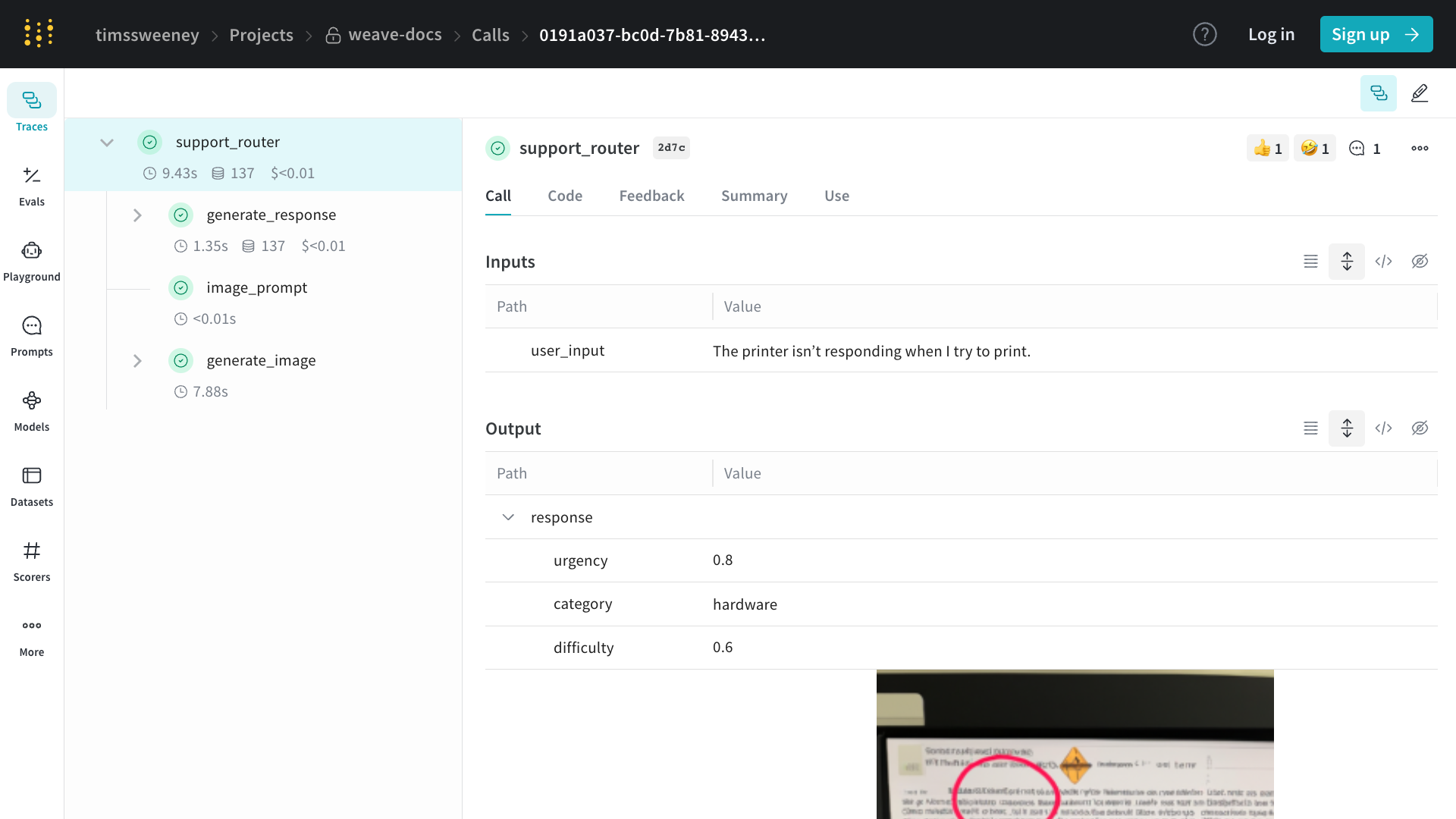
Webアプリでコールを表示するには:
- プロジェクトの「Traces」タブに移動します
- リストから表示したいコールを見つけます
- コールをクリックして詳細ページを開きます
詳細ページには、コールの入力、出力、実行時間、およびその他のメタデータが表示されます。
Python APIを使用してコールを表示するには、get_call method:import weave
# Initialize the client
client = weave.init("your-project-name")
# Get a specific call by its ID
call = client.get_call("call-uuid-here")
print(call)
カスタマイズされたトレースのレンダリングには weave.Markdown
Weaveを使用すると、元のデータを失うことなく、トレースされた操作の表示方法を簡単に調整できます。
weave.Markdown を使用すると、入力と出力をきれいで読みやすいフォーマットされたコンテンツブロックとしてレンダリングしながら、プログラムによるアクセスのために基礎となる構造化データを保持できます。
トレースの読みやすさを向上させるには、postprocess_inputs と postprocess_output を @weave.op デコレータで使用します。次のコードサンプルでは、ポストプロセッサを使用して、絵文字と見やすいフォーマットでWeaveにコールをレンダリングしています:import weave
def postprocess_inputs(query) -> weave.Markdown:
search_box = f"""
**Search Query:**
``+`
{query}
``+`
"""
return {"search_box": weave.Markdown(search_box),
"query": query}
def postprocess_output(docs) -> weave.Markdown:
formatted_docs = f"""
# {docs[0]["title"]}
{docs[0]["content"]}
[Read more]({docs[0]["url"]})
---
# {docs[1]["title"]}
{docs[1]["content"]}
[Read more]({docs[1]["url"]})
"""
return weave.Markdown(formatted_docs)
@weave.op(
postprocess_inputs=postprocess_inputs,
postprocess_output=postprocess_output,
)
def rag_step(query):
# example newspaper articles of the companies on the S&P 500
docs = [
{
"title": "OpenAI",
"content": "OpenAI is a company that makes AI models.",
"url": "https://www.openai.com",
},
{
"title": "Google",
"content": "Google is a company that makes search engines.",
"url": "https://www.google.com",
},
]
return docs
if __name__ == "__main__":
weave.init('markdown_renderers')
rag_step("Tell me about OpenAI")

import * as weave from 'weave'
// Initialize the client
const client = await weave.init('intro-example')
// Get a specific call by its ID
const call = await client.getCall('call-uuid-here')
console.log(call)
Service APIを使用してコールを表示するには、/call/read エンドポイントにリクエストを送信できます。curl -L 'https://trace.wandb.ai/call/read' \
-H 'Content-Type: application/json' \
-H 'Accept: application/json' \
-d '{
"project_id": "string",
"id": "string",
}'
コールの更新
コールは作成後はほとんど不変ですが、いくつかの変更がサポートされています:
これらの変更はすべて、コール詳細ページに移動してUIから実行できます:
表示名の設定
Python
TypeScript
HTTP API
コールの表示名を設定するには、Call.set_display_name メソッドを使用できます。import weave
# Initialize the client
client = weave.init("your-project-name")
# Get a specific call by its ID
call = client.get_call("call-uuid-here")
# Set the display name of the call
call.set_display_name("My Custom Display Name")
This feature is not available in TypeScript yet. Stay tuned!
Service APIを使用してコールの表示名を設定するには、/call/update エンドポイントにリクエストを送信できます。curl -L 'https://trace.wandb.ai/call/update' \
-H 'Content-Type: application/json' \
-H 'Accept: application/json' \
-d '{
"project_id": "string",
"call_id": "string",
"display_name": "string",
}'
フィードバックの追加
詳細については、フィードバックドキュメントを参照してください。
コールの削除
Python
TypeScript
HTTP API
Python APIを使用してコールを削除するには、Call.delete メソッドを使用できます。import weave
# Initialize the client
client = weave.init("your-project-name")
# Get a specific call by its ID
call = client.get_call("call-uuid-here")
# Delete the call
call.delete()
This feature is not available in TypeScript yet. Stay tuned!
Service APIを使用してコールを削除するには、/calls/delete エンドポイントにリクエストを送信できます。curl -L 'https://trace.wandb.ai/calls/delete' \
-H 'Content-Type: application/json' \
-H 'Accept: application/json' \
-d '{
"project_id": "string",
"call_ids": [
"string"
],
}'
複数のコールの削除
Python APIを使用してコールのバッチを削除するには、コールIDのリストを delete_calls()に渡します。import weave
# Initialize the client
client = weave.init("my-project")
# Get all calls from client
all_calls = client.get_calls()
# Get list of first 1000 Call objects
first_1000_calls = all_calls[:1000]
# Get list of first 1000 Call IDs
first_1000_calls_ids = [c.id for c in first_1000_calls]
# Delete first 1000 Call objects by ID
client.delete_calls(call_ids=first_1000_calls_ids)
This feature is not available in TypeScript yet. Stay tuned!
コールのクエリとエクスポート
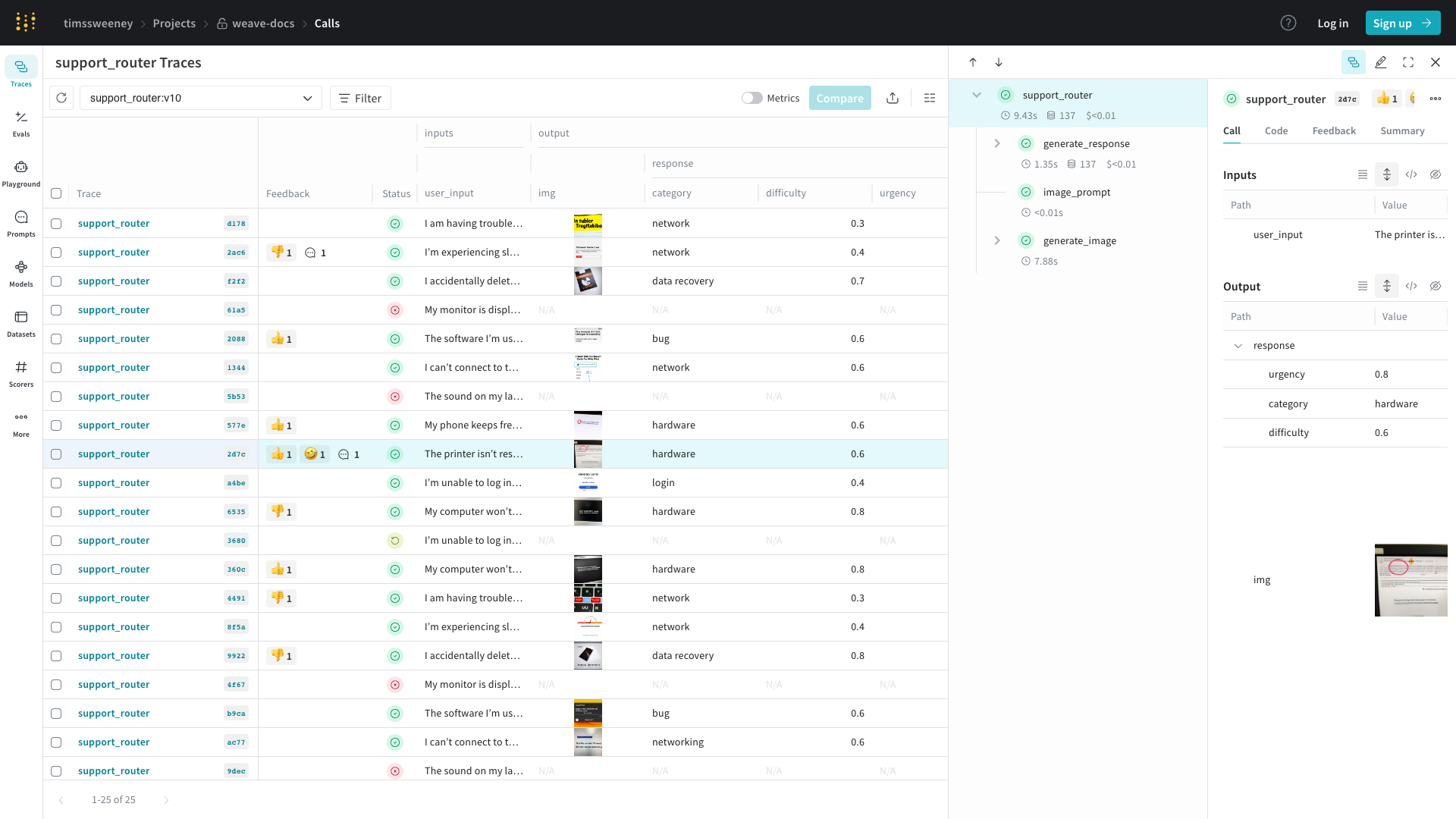
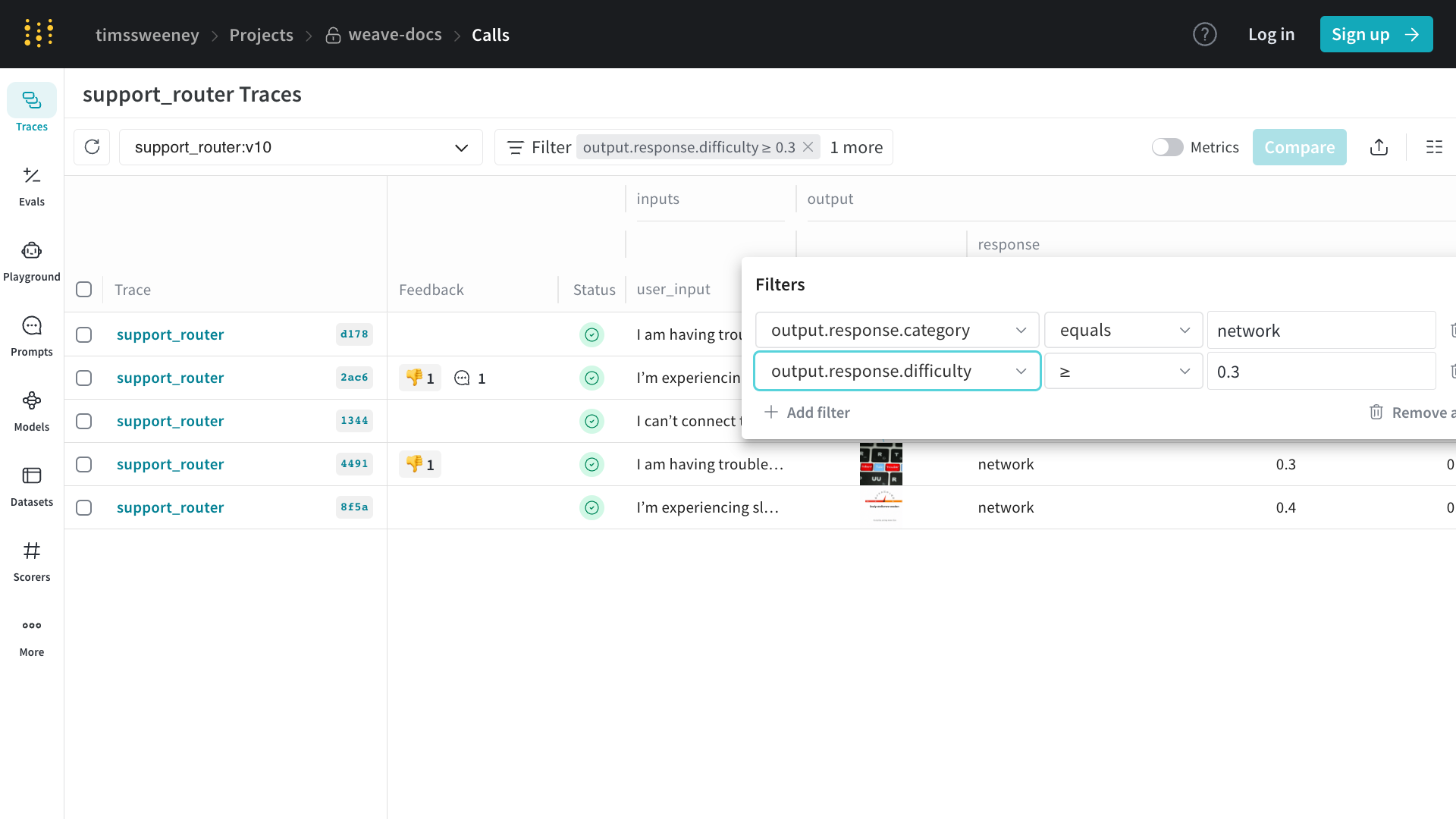
プロジェクトの /calls ページ(「Traces」タブ)には、プロジェクト内のすべてのコールのテーブルビューが含まれています。そこから、以下のことができます:
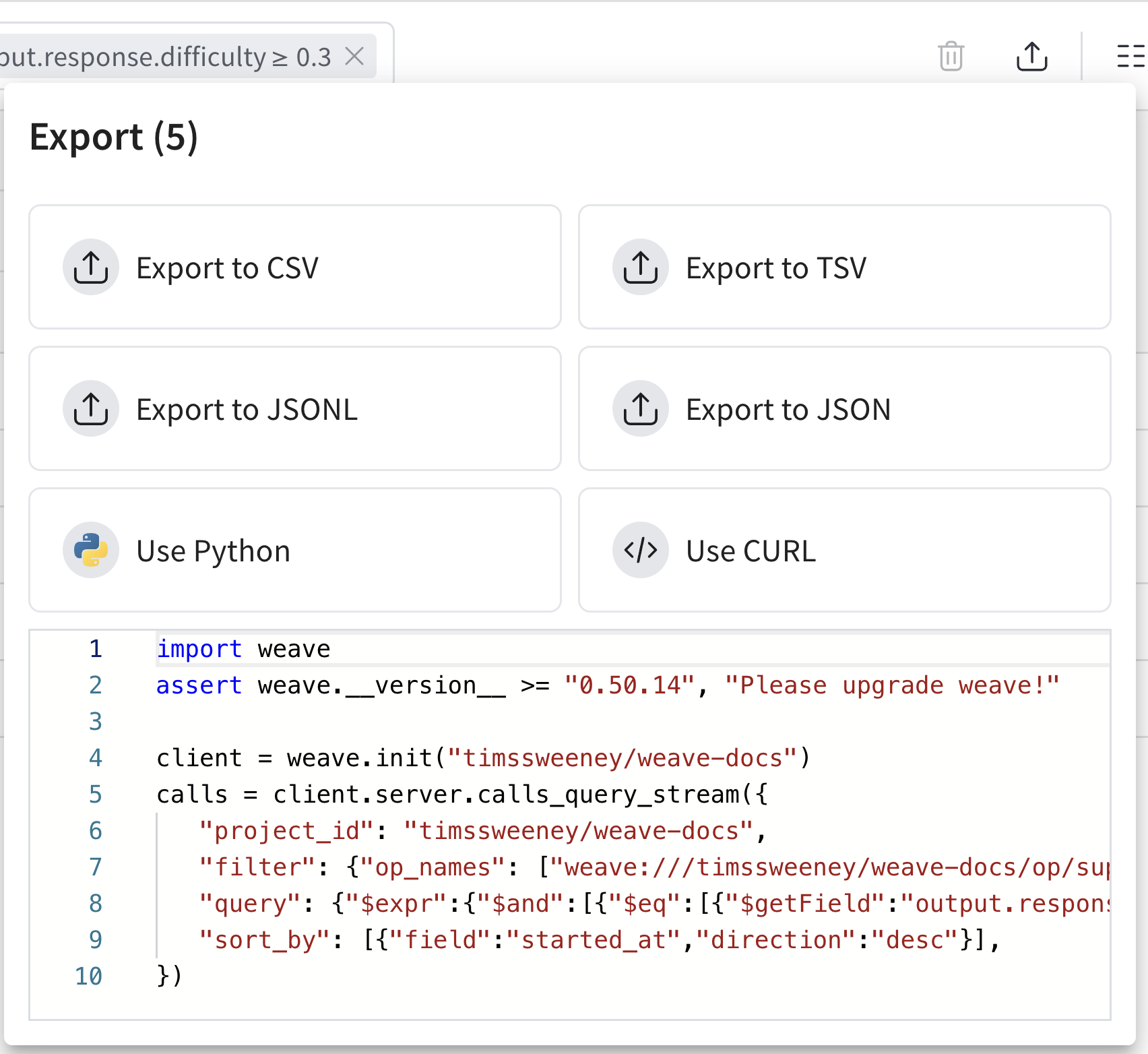
エクスポートモーダル(上図)では、データを様々な形式でエクスポートできるだけでなく、選択したコールのPythonとCURLの同等のコードも表示されます!
始めるには、UIでビューを構築し、生成されたコードスニペットからエクスポートAPIについて詳しく学ぶのが最も簡単な方法です。
Python
TypeScript
HTTP API
Python APIを使用してコールを取得するには、client.get_calls method:import weave
# Initialize the client
client = weave.init("your-project-name")
# Fetch calls
calls = client.get_calls(filter=...)
TypeScript APIを使用してコールを取得するには、client.getCalls メソッドを使用できます。import * as weave from 'weave'
// Initialize the client
const client = await weave.init('intro-example')
// Fetch calls
const calls = await client.getCalls(filter=...)
最も強力なクエリレイヤーはService APIにあります。Service APIを使用してコールを取得するには、/calls/stream_query エンドポイントにリクエストを送信できます。curl -L 'https://trace.wandb.ai/calls/stream_query' \
-H 'Content-Type: application/json' \
-H 'Accept: application/json' \
-d '{
"project_id": "string",
"filter": {
"op_names": [
"string"
],
"input_refs": [
"string"
],
"output_refs": [
"string"
],
"parent_ids": [
"string"
],
"trace_ids": [
"string"
],
"call_ids": [
"string"
],
"trace_roots_only": true,
"wb_user_ids": [
"string"
],
"wb_run_ids": [
"string"
]
},
"limit": 100,
"offset": 0,
"sort_by": [
{
"field": "string",
"direction": "asc"
}
],
"query": {
"$expr": {}
},
"include_costs": true,
"include_feedback": true,
"columns": [
"string"
],
"expand_columns": [
"string"
]
}'
コールスキーマ
フィールドの完全なリストについては、スキーマを参照してください。
| プロパティ | 型 | 説明 |
|---|
| id | string (uuid) | コールの一意の識別子 |
| project_id | string (オプション) | 関連するプロジェクト識別子 |
| op_name | string | 操作の名前(参照の場合あり) |
| display_name | string (オプション) | コールのユーザーフレンドリーな名前 |
| trace_id | string (uuid) | このコールが属するトレースの識別子 |
| parent_id | string (uuid) | 親コールの識別子 |
| started_at | datetime | コールが開始されたタイムスタンプ |
| attributes | Dict[str, Any] | コールに関するユーザー定義のメタデータ (実行中は読み取り専用) |
| inputs | Dict[str, Any] | コールの入力パラメータ |
| ended_at | datetime (オプション) | コールが終了したタイムスタンプ |
| exception | string (オプション) | コールが失敗した場合のエラーメッセージ |
| output | Any (オプション) | コールの結果 |
| summary | Optional[SummaryMap] | 実行後の要約情報。実行中にこれを変更してカスタムメトリクスを記録できます。 |
| wb_user_id | Optional[str] | 関連する Weights & Biases ユーザーID |
| wb_run_id | Optional[str] | 関連する Weights & Biases 実行ID |
| deleted_at | datetime (optional) | 該当する場合、コール削除のタイムスタンプ |
上記の表はWeaveにおけるCallの主要なプロパティを概説しています。各プロパティは関数呼び出しの追跡と管理において重要な役割を果たします:
- The
id, trace_id, and parent_id フィールドは、システム内でコールを整理し関連付けるのに役立ちます。
- タイミング情報(
started_at, ended_at)はパフォーマンス分析を可能にします。
- The
attributes and inputs フィールドはコールのコンテキストを提供します。属性はコールが開始されると固定されるため、weave.attributes で呼び出し前に設定してください。output and summary は結果をキャプチャし、summary は実行中に更新して追加のメトリクスを記録できます。
- Weights & Biasesとの統合は
wb_user_id and wb_run_id を通じて実現されます。
このプロパティの包括的なセットにより、プロジェクト全体を通じて関数呼び出しの詳細な追跡と分析が可能になります。
計算フィールド:
保存されたビュー
トレーステーブルの構成、フィルター、並べ替えを saved views として保存し、お好みの設定に素早くアクセスできます。UIとPython SDKを通じて保存されたビューを設定およびアクセスできます。詳細については、Saved Views をご覧ください。
トレーステーブルでW&B実行を表示する
Weaveを使用すると、コード内の関数呼び出しを追跡し、それらを実行された W&B runs に直接リンクできます。
@weave.op()で関数をトレースし、wandb.init()コンテキスト内で呼び出すと、WeaveはトレースをW&B実行に自動的に関連付けます。
関連する実行へのリンクはトレーステーブルに表示されます。
Python例
以下のPythonコードは、トレースされた操作が wandb.init() コンテキスト内で実行されるとW&B実行にリンクされる方法を示しています。これらのトレースはWeave UIに表示され、対応する実行に関連付けられます。
import wandb
import weave
def example_wandb(projname):
# Split projname into entity and project
entity, project = projname.split("/", 1)
# Initialize Weave context for tracing
weave.init(projname)
# Define a traceable operation
@weave.op()
def say(message: str) -> str:
return f"I said: {message}"
# First W&B run
with wandb.init(
entity=entity,
project=project,
notes="Experiment 1",
tags=["baseline", "paper1"],
) as run:
say("Hello, world!")
say("How are you!")
run.log({"messages": 2})
# Second W&B run
with wandb.init(
entity=entity,
project=project,
notes="Experiment 2",
tags=["baseline", "paper1"],
) as run:
say("Hello, world from experiment 2!")
say("How are you!")
run.log({"messages": 2})
if __name__ == "__main__":
# Replace this with your actual W&B username/project
example_wandb("your-username/your-project")
コードサンプルを使用するには:
-
ターミナルで依存関係をインストールします:
-
W&Bにログインします:
-
スクリプトで、
your-username/your-project を実際のW&Bエンティティ/プロジェクトに置き換えます。
-
スクリプトを実行します:
python weave_trace_with_wandb.py
-
Visit https://weave.wandb.ai にアクセスしてプロジェクトを選択します。
-
Traces タブで、トレース出力を表示します。関連する実行へのリンクはトレーステーブルに表示されます。
自動パッチの設定
デフォルトでは、Weaveは openai, anthropic, cohere, and mistral などの一般的なLLMライブラリへの呼び出しを自動的にパッチし追跡します。
この動作は autopatch_settings 引数を weave.init で使用して制御できます。
すべての自動パッチを無効にする
weave.init(..., autopatch_settings={"disable_autopatch": True})
特定の統合を無効にする
weave.init(..., autopatch_settings={"openai": {"enabled": False}})
入力と出力の後処理
自動パッチング中に入力と出力(例:PII データ)を後処理する方法をカスタマイズすることもできます:
def redact_inputs(inputs: dict) -> dict:
if "email" in inputs:
inputs["email"] = "[REDACTED]"
return inputs
weave.init(
...,
autopatch_settings={
"openai": {
"op_settings": {
"postprocess_inputs": redact_inputs,
}
}
}
)
詳細については、How to use Weave with PII data をご覧ください。
よくある質問
大きなトレースが切り捨てられないようにするにはどうすればよいですか?
詳細については、Trace data is truncated を Troubleshooting guide でご覧ください。
トレースを無効にするにはどうすればよいですか?
環境変数
プログラム全体のトレースを無条件に無効にしたい場合は、環境変数 WEAVE_DISABLED=true を設定できます。
クライアント初期化
特定の条件に基づいて特定の初期化のトレースを条件付きで有効にしたい場合があります。この場合、初期設定で disabled フラグを使用してクライアントを初期化できます。
import weave
# Initialize the client
client = weave.init(..., settings={"disabled": True})
コンテキストマネージャー
最後に、アプリケーションロジックに基づいて単一の関数のトレースを条件付きで無効にしたい場合があります。この場合、コンテキストマネージャー with set_tracing_enabled(False) を使用できます。これは weave.trace.context.call_context からインポートできます。
import weave
from weave.trace.context.call_context import set_tracing_enabled
client = weave.init(...)
@weave.op
def my_op():
...
with set_tracing_enabled(False):
my_op()
Callに関する情報をキャプチャするにはどうすればよいですか?
通常、opを直接呼び出します:
@weave.op
def my_op():
...
my_op()
ただし、opの call メソッドを呼び出すことで、コールオブジェクトに直接アクセスすることもできます:
@weave.op
def my_op():
...
output, call = my_op.call()
ここから、call オブジェクトには、入力、出力、その他のメタデータを含むコールに関するすべての情報が含まれます。