Documentation Index
Fetch the complete documentation index at: https://wb-21fd5541-feature-automate-reference-docs-generation.mintlify.app/llms.txt
Use this file to discover all available pages before exploring further.
Calls
Calls는 Weave의 기본 구성 요소입니다. 다음을 포함하는 함수의 단일 실행을 나타냅니다:
- 입력(인수)
- 출력(반환 값)
- 메타데이터(지속 시간, 예외, LLM 사용량 등)
Calls는 다음과 유사합니다 OpenTelemetry 데이터 모델의 스팬. Call은 다음과 같은 특징이 있습니다:
- Trace에 속함(동일한 실행 컨텍스트에 있는 calls 모음)
- 부모 및 자식 Calls를 가질 수 있으며, 트리 구조를 형성함
Calls 생성하기
Weave에서 Calls를 생성하는 세 가지 주요 방법이 있습니다:
1. LLM 라이브러리의 자동 추적
Weave는 자동으로 일반적인 LLM 라이브러리 호출을 추적합니다 예를 들면 openai, anthropic, cohere, 그리고 mistral. 프로그램 시작 시 간단히 weave.init('project_name')를 호출하세요:import weave
from openai import OpenAI
client = OpenAI()
# Initialize Weave Tracing
weave.init('intro-example')
response = client.chat.completions.create(
model="gpt-4",
messages=[
{
"role": "user",
"content": "How are you?"
}
],
temperature=0.8,
max_tokens=64,
top_p=1,
)
Weave는 자동으로 일반적인 LLM 라이브러리 호출을 추적합니다, 예를 들면 openai.import OpenAI from 'openai'
import * as weave from 'weave'
const client = new OpenAI()
// Initialize Weave Tracing
await weave.init('intro-example')
const response = await client.chat.completions.create({
model: 'gpt-4',
messages: [
{
role: 'user',
content: 'How are you?',
},
],
temperature: 0.8,
max_tokens: 64,
top_p: 1,
});
JS / TS 프로젝트의 전체 설정 가이드는 TypeScript SDK: 서드파티 통합 가이드를 참조하세요.
Call의 summary
사전에 메트릭이나 다른 호출 후 값을 저장할 수 있습니다. call.summary를 실행 중에 수정하면 추가한 모든
값이 호출이 완료될 때 Weave의 계산된 요약 데이터와 병합됩니다.
2. 함수 데코레이팅 및 래핑
그러나 종종 LLM 애플리케이션에는 추적하고 싶은 추가 로직(예: 전/후 처리, 프롬프트 등)이 있습니다.
Weave를 사용하면 @weave.op 데코레이터를 사용하여 이러한 호출을 수동으로 추적할 수 있습니다. 예를 들면:import weave
# Initialize Weave Tracing
weave.init('intro-example')
# Decorate your function
@weave.op
def my_function(name: str):
return f"Hello, {name}!"
# Call your function -- Weave will automatically track inputs and outputs
print(my_function("World"))
또한 클래스의 메서드도 추적할 수 있습니다.동기 및 비동기 제너레이터 함수 추적
Weave는 깊게 중첩된 패턴을 포함하여 동기 및 비동기 제너레이터 함수 모두를 추적할 수 있습니다.제너레이터는 값을 지연 생성하므로 출력은 제너레이터가 완전히 소비될 때만 기록됩니다(예: 리스트로 변환할 때).
추적에 출력이 캡처되도록 하려면 제너레이터를 완전히 소비하세요(예: list() 사용).
from typing import Generator
import weave
weave.init("my-project")
# This function uses a simple sync generator.
# Weave will trace the call and its input (`x`),
# but output values are only captured once the generator is consumed (e.g., via `list()`).
@weave.op
def basic_gen(x: int) -> Generator[int, None, None]:
yield from range(x)
# A normal sync function used within the generator pipeline.
# Its calls are also traced independently by Weave.
@weave.op
def inner(x: int) -> int:
return x + 1
# A sync generator that calls another traced function (`inner`).
# Each yielded value comes from a separate traced call to `inner`.
@weave.op
def nested_generator(x: int) -> Generator[int, None, None]:
for i in range(x):
yield inner(i)
# A more complex generator that composes the above generator.
# Tracing here produces a hierarchical call tree:
# - `deeply_nested_generator` (parent)
# - `nested_generator` (child)
# - `inner` (grandchild)
@weave.op
def deeply_nested_generator(x: int) -> Generator[int, None, None]:
for i in range(x):
for j in nested_generator(i):
yield j
# The generator must be *consumed* for Weave to capture outputs.
# This is true for both sync and async generators.
res = deeply_nested_generator(4)
list(res) # Triggers tracing of all nested calls and yields

Weave를 사용하면 weave.op로 함수를 래핑하여 이러한 호출을 수동으로 추적할 수 있습니다. 예를 들면:import * as weave from 'weave'
await weave.init('intro-example')
function myFunction(name: string) {
return `Hello, ${name}!`
}
const myFunctionOp = weave.op(myFunction)
인라인으로 래핑을 정의할 수도 있습니다:const myFunctionOp = weave.op((name: string) => `Hello, ${name}!`)
이는 함수뿐만 아니라 클래스의 메서드에도 작동합니다:class MyClass {
constructor() {
this.myMethod = weave.op(this.myMethod)
}
myMethod(name: string) {
return `Hello, ${name}!`
}
}
실행 중 call 객체에 대한 핸들 얻기
때로는 Call 객체 자체에 대한 핸들을 얻는 것이 유용합니다. op.call 메서드를 호출하여 결과와 Call 객체를 모두 반환받을 수 있습니다. 예를 들면:result, call = my_function.call("World")
그런 다음, call를 사용하여 추가 속성을 설정/업데이트/가져올 수 있습니다(주로 피드백에 사용할 호출 ID를 가져오는 데 사용됨).op가 클래스의 메서드인 경우, 인스턴스를 op의 첫 번째 인수로 전달해야 합니다(아래 예제 참조).
# Notice that we pass the `instance` as the first argument.
print(instance.my_method.call(instance, "World"))
import weave
# Initialize Weave Tracing
weave.init("intro-example")
class MyClass:
# Decorate your method
@weave.op
def my_method(self, name: str):
return f"Hello, {name}!"
instance = MyClass()
# Call your method -- Weave will automatically track inputs and outputs
instance.my_method.call(instance, "World")
This feature is not available in TypeScript yet. Stay tuned!
Call 표시 이름
때로는 호출의 표시 이름을 재정의하고 싶을 수 있습니다. 다음 네 가지 방법 중 하나로 이를 달성할 수 있습니다:
- op를 호출할 때 표시 이름 변경:
result = my_function("World", __weave={"display_name": "My Custom Display Name"})
사용 __weave 사전은 호출 표시 이름을 설정하며, 이는 Op 표시 이름보다 우선합니다.
- 호출별로 표시 이름 변경. 이는
Op.call 메서드를 사용하여 Call 객체를 반환한 다음, Call.set_display_name를 사용하여 표시 이름을 설정합니다.
result, call = my_function.call("World")
call.set_display_name("My Custom Display Name")
- 주어진 Op의 모든 Calls에 대한 표시 이름 변경:
@weave.op(call_display_name="My Custom Display Name")
def my_function(name: str):
return f"Hello, {name}!"
-
이
call_display_name는 Call 객체를 받아 문자열을 반환하는 함수일 수도 있습니다. Call 객체는 함수가 호출될 때 자동으로 전달되므로, 함수 이름, 호출 입력, 필드 등을 기반으로 이름을 동적으로 생성하는 데 사용할 수 있습니다.
-
일반적인 사용 사례 중 하나는 함수 이름에 타임스탬프를 추가하는 것입니다.
from datetime import datetime
@weave.op(call_display_name=lambda call: f"{call.func_name}__{datetime.now()}")
def func():
return ...
-
다음을 사용하여 사용자 정의 메타데이터를 기록할 수도 있습니다
.attributes
def custom_attribute_name(call):
model = call.attributes["model"]
revision = call.attributes["revision"]
now = call.attributes["date"]
return f"{model}__{revision}__{now}"
@weave.op(call_display_name=custom_attribute_name)
def func():
return ...
with weave.attributes(
{
"model": "finetuned-llama-3.1-8b",
"revision": "v0.1.2",
"date": "2024-08-01",
}
):
func() # the display name will be "finetuned-llama-3.1-8b__v0.1.2__2024-08-01"
with weave.attributes(
{
"model": "finetuned-gpt-4o",
"revision": "v0.1.3",
"date": "2024-08-02",
}
):
func() # the display name will be "finetuned-gpt-4o__v0.1.3__2024-08-02"
기술적 참고: “Calls”는 “Ops”에 의해 생성됩니다. Op는 @weave.op로 데코레이트된 함수나 메서드입니다.
기본적으로 Op의 이름은 함수 이름이며, 관련 호출은 동일한 표시 이름을 갖습니다. 위의 예는 주어진 Op의 모든 Calls에 대한 표시 이름을 재정의하는 방법을 보여줍니다. 때로는 사용자가 Op 자체의 이름을 재정의하고 싶을 수 있습니다. 이는 다음 두 가지 방법 중 하나로 달성할 수 있습니다:
- 호출이 기록되기 전에 Op의
name 속성 설정
my_function.name = "My Custom Op Name"
- op 데코레이터에
name 옵션 설정
@weave.op(name="My Custom Op Name)
This feature is not available in TypeScript yet. Stay tuned!
추적된 함수를 호출할 때 weave.attributes 컨텍스트 관리자를 사용하여 호출에 추가 메타데이터를 추가할 수 있습니다. 아래 예에서는 env로 지정된 호출에 'production' 속성을 추가합니다.# ... continued from above ...
# Add additional attributes to the call
with weave.attributes({'env': 'production'}):
print(my_function.call("World"))
call.attributes는 호출이 시작되면 수정할 수 없습니다. 이
컨텍스트 관리자를 사용하여 op를 호출하기 전에 메타데이터를 설정하세요.
This feature is not available in TypeScript yet. Stay tuned!
병렬(멀티스레드) 함수 호출 추적
기본적으로 병렬 호출은 모두 Weave에서 별도의 루트 호출로 표시됩니다. 동일한 부모 op 아래에 올바른 중첩을 얻으려면 ThreadPoolExecutor를 사용하세요.다음 코드 샘플은 ThreadPoolExecutor의 사용을 보여줍니다.
첫 번째 함수인 func는 간단한 op로 x를 받아 x+1를 반환합니다. 두 번째 함수인 outer는 또 다른 op로 입력 목록을 받습니다.
outer 내부에서 ThreadPoolExecutor와 exc.map(func, inputs)의 사용은 func에 대한 각 호출이 여전히 동일한 부모 추적 컨텍스트를 가지고 있음을 의미합니다.import weave
@weave.op
def func(x):
return x+1
@weave.op
def outer(inputs):
with weave.ThreadPoolExecutor() as exc:
exc.map(func, inputs)
# Update your Weave project name
client = weave.init('my-weave-project')
outer([1,2,3,4,5])
Weave UI에서는 이것이 다섯 개의 중첩된 자식 호출이 있는 단일 부모 호출을 생성하므로, 증분이 병렬로 실행되더라도 완전히 계층적인 추적을 얻을 수 있습니다.
3. 수동 Call 추적
API를 직접 사용하여 수동으로 Calls를 생성할 수도 있습니다.
Python
TypeScript
HTTP API
import weave
# Initialize Weave Tracing
client = weave.init('intro-example')
def my_function(name: str):
# Start a call
call = client.create_call(op="my_function", inputs={"name": name})
# ... your function code ...
# End a call
client.finish_call(call, output="Hello, World!")
# Call your function
print(my_function("World"))
This feature is not available in TypeScript yet. Stay tuned!
curl -L 'https://trace.wandb.ai/call/start' \
-H 'Content-Type: application/json' \
-H 'Accept: application/json' \
-d '{
"start": {
"project_id": "string",
"id": "string",
"op_name": "string",
"display_name": "string",
"trace_id": "string",
"parent_id": "string",
"started_at": "2024-09-08T20:07:34.849Z",
"attributes": {},
"inputs": {},
"wb_run_id": "string"
}
}
4. 클래스 및 객체 메서드 추적
클래스 및 객체 메서드도 추적할 수 있습니다.
클래스의 모든 메서드를 추적하려면 weave.op.import weave
# Initialize Weave Tracing
weave.init("intro-example")
class MyClass:
# Decorate your method
@weave.op
def my_method(self, name: str):
return f"Hello, {name}!"
instance = MyClass()
# Call your method -- Weave will automatically track inputs and outputs
print(instance.my_method("World"))
클래스 메서드 데코레이팅
인스턴스 메서드를 추적하려면 @weave.op를 사용하세요.class Foo {
@weave.op
async predict(prompt: string) {
return "bar"
}
}
정적 클래스 메서드 데코레이팅
클래스 내 유틸리티 함수를 모니터링하려면 정적 메서드에 @weave.op를 적용하세요.class MathOps {
@weave.op
static square(n: number): number {
return n * n;
}
}
통화 보기
웹 앱
Python
TypeScript
HTTP API
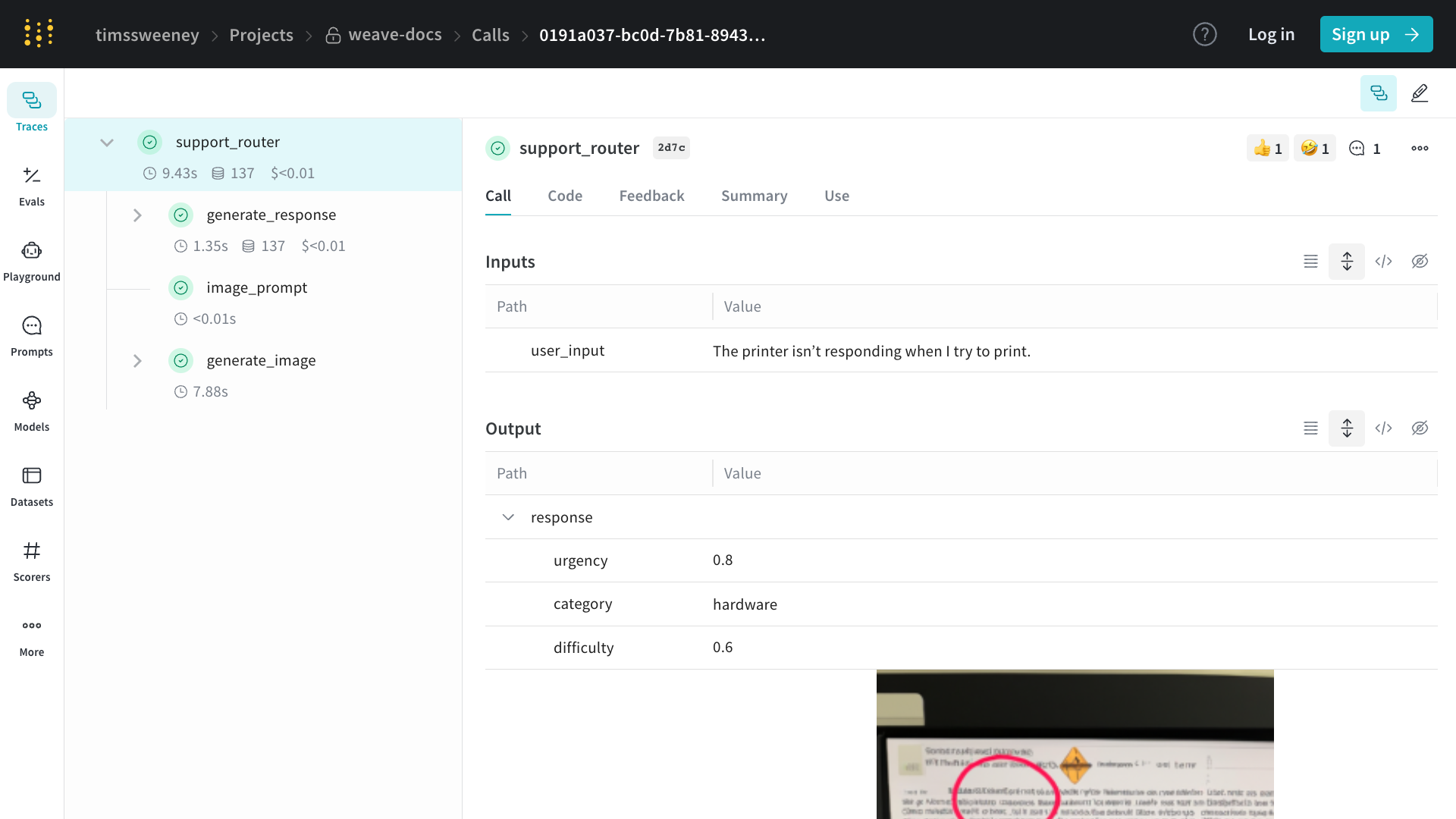
웹 앱에서 통화를 보려면:
- 프로젝트의 “Traces” 탭으로 이동
- 목록에서 보고 싶은 통화 찾기
- 통화를 클릭하여 세부 정보 페이지 열기
세부 정보 페이지에는 통화의 입력, 출력, 실행 시간 및 추가 메타데이터가 표시됩니다.
Python API를 사용하여 통화를 보려면 get_call method:import weave
# Initialize the client
client = weave.init("your-project-name")
# Get a specific call by its ID
call = client.get_call("call-uuid-here")
print(call)
를 사용하여 렌더링된 트레이스 사용자 정의 weave.Markdown
Weave를 사용하면 원본 데이터를 잃지 않고 추적된 작업이 표시되는 방식을 쉽게 조정할 수 있습니다.
weave.Markdown를 사용하면 프로그래밍 방식으로 액세스할 수 있도록 기본 구조화된 데이터를 보존하면서 입력과 출력을 깔끔하고 읽기 쉬운 형식의 콘텐츠 블록으로 렌더링할 수 있습니다.
postprocess_inputs와 postprocess_output를 @weave.op 데코레이터에서 사용하여 트레이스 가독성을 향상시키세요.다음 코드 샘플은 이모지와 더 나은 형식으로 Weave에서 통화를 렌더링하기 위해 후처리기를 사용합니다:import weave
def postprocess_inputs(query) -> weave.Markdown:
search_box = f"""
**Search Query:**
``+`
{query}
``+`
"""
return {"search_box": weave.Markdown(search_box),
"query": query}
def postprocess_output(docs) -> weave.Markdown:
formatted_docs = f"""
# {docs[0]["title"]}
{docs[0]["content"]}
[Read more]({docs[0]["url"]})
---
# {docs[1]["title"]}
{docs[1]["content"]}
[Read more]({docs[1]["url"]})
"""
return weave.Markdown(formatted_docs)
@weave.op(
postprocess_inputs=postprocess_inputs,
postprocess_output=postprocess_output,
)
def rag_step(query):
# example newspaper articles of the companies on the S&P 500
docs = [
{
"title": "OpenAI",
"content": "OpenAI is a company that makes AI models.",
"url": "https://www.openai.com",
},
{
"title": "Google",
"content": "Google is a company that makes search engines.",
"url": "https://www.google.com",
},
]
return docs
if __name__ == "__main__":
weave.init('markdown_renderers')
rag_step("Tell me about OpenAI")

import * as weave from 'weave'
// Initialize the client
const client = await weave.init('intro-example')
// Get a specific call by its ID
const call = await client.getCall('call-uuid-here')
console.log(call)
Service API를 사용하여 통화를 보려면 /call/read 엔드포인트에 요청을 보낼 수 있습니다.curl -L 'https://trace.wandb.ai/call/read' \
-H 'Content-Type: application/json' \
-H 'Accept: application/json' \
-d '{
"project_id": "string",
"id": "string",
}'
통화 업데이트
통화는 생성된 후에는 대부분 변경할 수 없지만, 지원되는 몇 가지 변경 사항이 있습니다:
이러한 모든 변경은 통화 세부 정보 페이지로 이동하여 UI에서 수행할 수 있습니다:
표시 이름 설정
Python
TypeScript
HTTP API
통화의 표시 이름을 설정하려면 Call.set_display_name 메서드를 사용할 수 있습니다.import weave
# Initialize the client
client = weave.init("your-project-name")
# Get a specific call by its ID
call = client.get_call("call-uuid-here")
# Set the display name of the call
call.set_display_name("My Custom Display Name")
This feature is not available in TypeScript yet. Stay tuned!
Service API를 사용하여 통화의 표시 이름을 설정하려면 /call/update 엔드포인트에 요청을 보낼 수 있습니다.curl -L 'https://trace.wandb.ai/call/update' \
-H 'Content-Type: application/json' \
-H 'Accept: application/json' \
-d '{
"project_id": "string",
"call_id": "string",
"display_name": "string",
}'
피드백 추가
자세한 내용은 피드백 문서를 참조하세요.
통화 삭제
Python
TypeScript
HTTP API
Python API를 사용하여 통화를 삭제하려면 Call.delete 메서드를 사용할 수 있습니다.import weave
# Initialize the client
client = weave.init("your-project-name")
# Get a specific call by its ID
call = client.get_call("call-uuid-here")
# Delete the call
call.delete()
This feature is not available in TypeScript yet. Stay tuned!
Service API를 사용하여 통화를 삭제하려면 /calls/delete 엔드포인트에 요청을 보낼 수 있습니다.curl -L 'https://trace.wandb.ai/calls/delete' \
-H 'Content-Type: application/json' \
-H 'Accept: application/json' \
-d '{
"project_id": "string",
"call_ids": [
"string"
],
}'
여러 통화 삭제
Python API를 사용하여 통화 배치를 삭제하려면 통화 ID 목록을 delete_calls()에 전달하세요.import weave
# Initialize the client
client = weave.init("my-project")
# Get all calls from client
all_calls = client.get_calls()
# Get list of first 1000 Call objects
first_1000_calls = all_calls[:1000]
# Get list of first 1000 Call IDs
first_1000_calls_ids = [c.id for c in first_1000_calls]
# Delete first 1000 Call objects by ID
client.delete_calls(call_ids=first_1000_calls_ids)
This feature is not available in TypeScript yet. Stay tuned!
통화 쿼리 및 내보내기
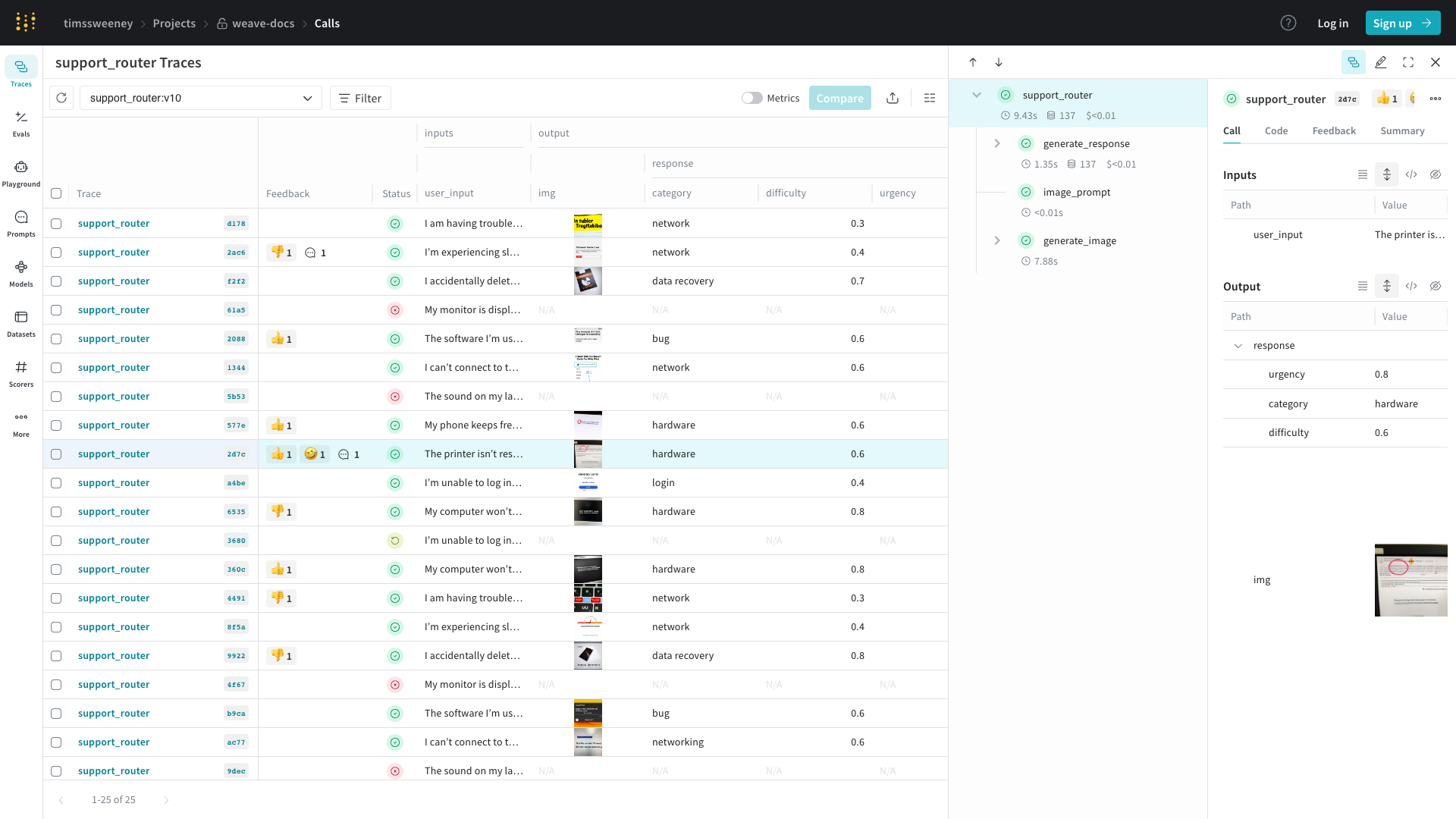
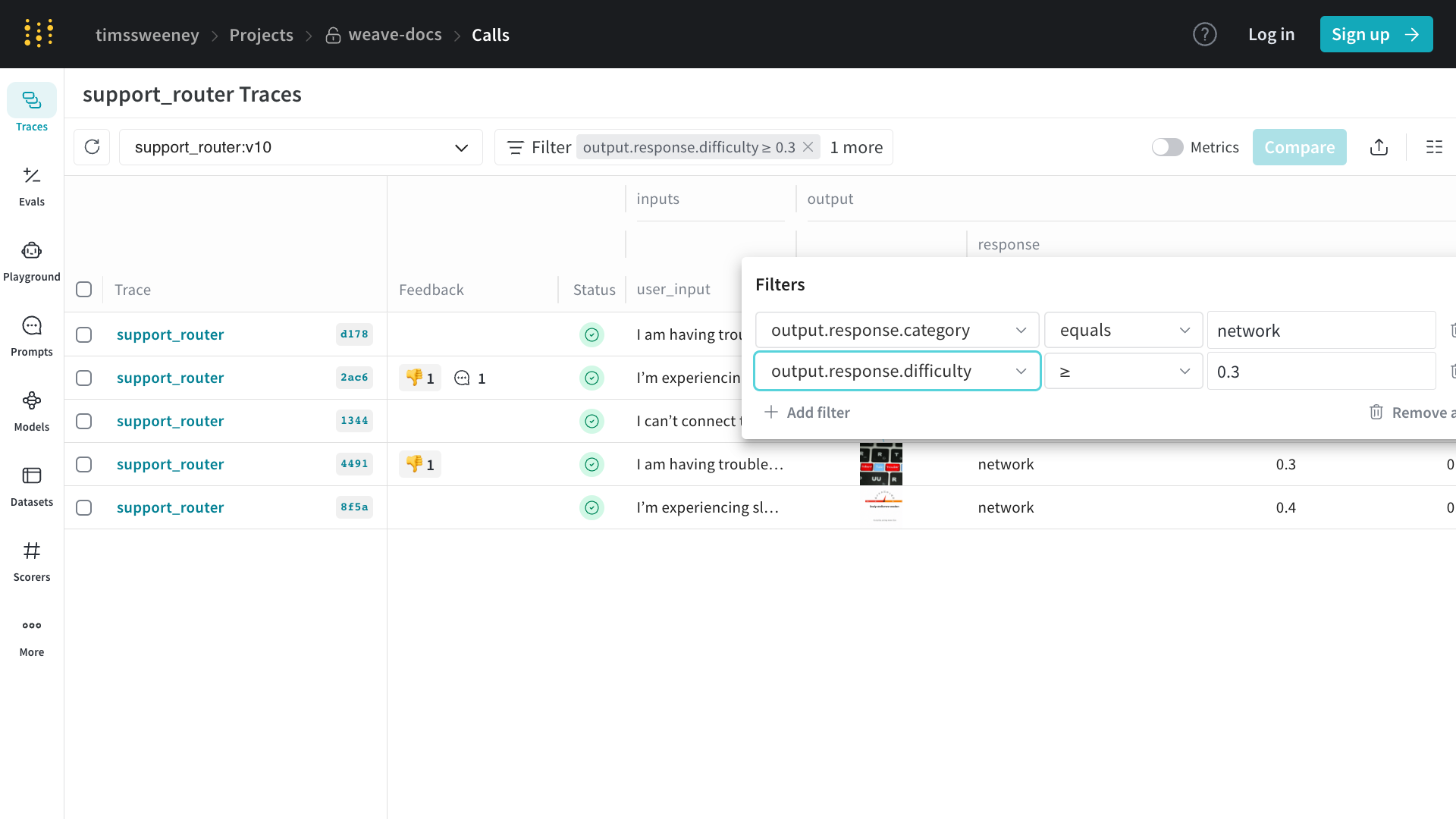
프로젝트의 /calls 페이지(“Traces” 탭)에는 프로젝트의 모든 통화에 대한 테이블 뷰가 포함되어 있습니다. 여기에서 다음을 수행할 수 있습니다:
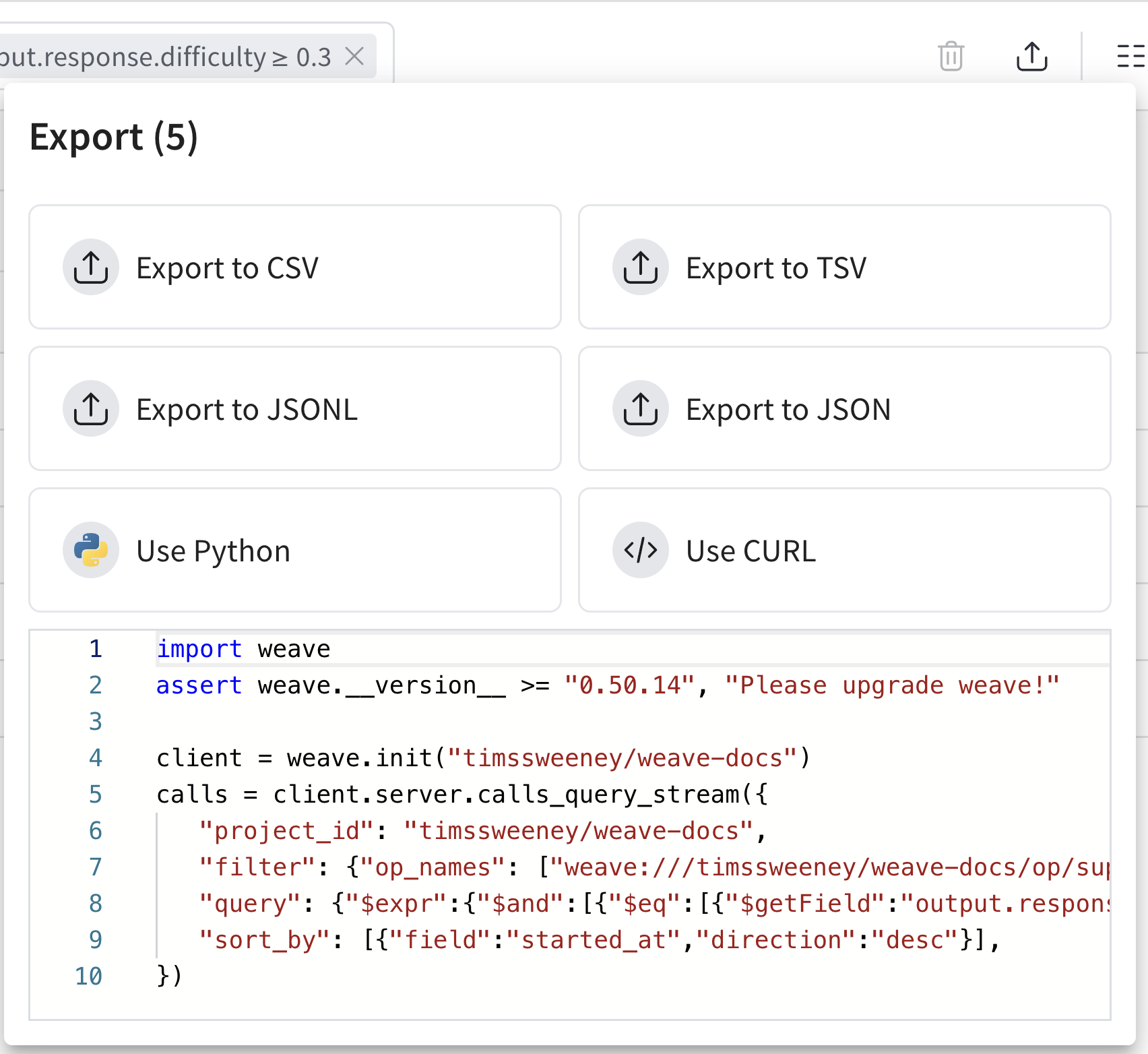
내보내기 모달(위에 표시됨)을 사용하면 여러 형식으로 데이터를 내보낼 수 있으며, 선택한 통화에 대한 Python 및 CURL 등가물도 보여줍니다!
가장 쉬운 시작 방법은 UI에서 뷰를 구성한 다음 생성된 코드 스니펫을 통해 내보내기 API에 대해 자세히 알아보는 것입니다.
Python
TypeScript
HTTP API
Python API를 사용하여 통화를 가져오려면 client.get_calls method:import weave
# Initialize the client
client = weave.init("your-project-name")
# Fetch calls
calls = client.get_calls(filter=...)
TypeScript API를 사용하여 통화를 가져오려면 client.getCalls 메서드를 사용할 수 있습니다.import * as weave from 'weave'
// Initialize the client
const client = await weave.init('intro-example')
// Fetch calls
const calls = await client.getCalls(filter=...)
가장 강력한 쿼리 레이어는 Service API에 있습니다. Service API를 사용하여 통화를 가져오려면 /calls/stream_query 엔드포인트에 요청을 보낼 수 있습니다.curl -L 'https://trace.wandb.ai/calls/stream_query' \
-H 'Content-Type: application/json' \
-H 'Accept: application/json' \
-d '{
"project_id": "string",
"filter": {
"op_names": [
"string"
],
"input_refs": [
"string"
],
"output_refs": [
"string"
],
"parent_ids": [
"string"
],
"trace_ids": [
"string"
],
"call_ids": [
"string"
],
"trace_roots_only": true,
"wb_user_ids": [
"string"
],
"wb_run_ids": [
"string"
]
},
"limit": 100,
"offset": 0,
"sort_by": [
{
"field": "string",
"direction": "asc"
}
],
"query": {
"$expr": {}
},
"include_costs": true,
"include_feedback": true,
"columns": [
"string"
],
"expand_columns": [
"string"
]
}'
통화 스키마
전체 필드 목록은 schema를 참조하세요.
| 속성 | 타입 | 설명 |
|---|
| id | string (uuid) | 통화의 고유 식별자 |
| project_id | string (선택 사항) | 관련 프로젝트 식별자 |
| op_name | string | 작업 이름(참조일 수 있음) |
| display_name | string (선택 사항) | 통화의 사용자 친화적 이름 |
| trace_id | string (uuid) | 이 통화가 속한 트레이스의 식별자 |
| parent_id | string (uuid) | 부모 통화의 식별자 |
| started_at | datetime | 통화가 시작된 타임스탬프 |
| attributes | Dict[str, Any] | 통화에 대한 사용자 정의 메타데이터 (실행 중에는 읽기 전용) |
| inputs | Dict[str, Any] | 통화의 입력 매개변수 |
| ended_at | datetime (선택 사항) | 통화가 종료된 타임스탬프 |
| exception | string (선택 사항) | 통화가 실패한 경우 오류 메시지 |
| output | Any (선택 사항) | 통화 결과 |
| summary | Optional[SummaryMap] | 실행 후 요약 정보. 실행 중에 이를 수정하여 사용자 정의 메트릭을 기록할 수 있습니다. |
| wb_user_id | Optional[str] | 연결된 Weights & Biases 사용자 ID |
| wb_run_id | Optional[str] | 연결된 Weights & Biases 실행 ID |
| deleted_at | datetime (optional) | 해당되는 경우 호출 삭제 타임스탬프 |
위 표는 Weave에서 Call의 주요 속성을 설명합니다. 각 속성은 함수 호출을 추적하고 관리하는 데 중요한 역할을 합니다:
- The
id, trace_id, and parent_id fields help in organizing and relating calls within the system.
- Timing information (
started_at, ended_at) allows for performance analysis.
- The
attributes and inputs fields provide context for the call. Attributes are frozen once the call starts, so set them before invocation with weave.attributes. output and summary capture the results, and you can update summary during execution to log additional metrics.
- Integration with Weights & Biases is facilitated through
wb_user_id and wb_run_id.
이러한 포괄적인 속성 집합을 통해 프로젝트 전체에서 함수 호출에 대한 상세한 추적 및 분석이 가능합니다.
계산된 필드:
저장된 뷰
Trace 테이블 구성, 필터 및 정렬을 저장된 뷰로 저장하여 선호하는 설정에 빠르게 접근할 수 있습니다. UI와 Python SDK를 통해 저장된 뷰를 구성하고 접근할 수 있습니다. 자세한 내용은 Saved Views를 참조하세요.
Traces 테이블에서 W&B 실행 보기
Weave를 사용하면 코드의 함수 호출을 추적하고 이를 실행된 W&B runs에 직접 연결할 수 있습니다.
wandb.init() 컨텍스트 내에서 @weave.op()로 함수를 추적하고 호출하면, Weave는 자동으로 해당 추적을 W&B 실행과 연결합니다.
관련된 모든 실행에 대한 링크는 Traces 테이블에 표시됩니다.
Python 예제
다음 Python 코드는 추적된 작업이 wandb.init() 컨텍스트 내에서 실행될 때 W&B 실행에 어떻게 연결되는지 보여줍니다. 이러한 추적은 Weave UI에 나타나며 해당 실행과 연결됩니다.
import wandb
import weave
def example_wandb(projname):
# Split projname into entity and project
entity, project = projname.split("/", 1)
# Initialize Weave context for tracing
weave.init(projname)
# Define a traceable operation
@weave.op()
def say(message: str) -> str:
return f"I said: {message}"
# First W&B run
with wandb.init(
entity=entity,
project=project,
notes="Experiment 1",
tags=["baseline", "paper1"],
) as run:
say("Hello, world!")
say("How are you!")
run.log({"messages": 2})
# Second W&B run
with wandb.init(
entity=entity,
project=project,
notes="Experiment 2",
tags=["baseline", "paper1"],
) as run:
say("Hello, world from experiment 2!")
say("How are you!")
run.log({"messages": 2})
if __name__ == "__main__":
# Replace this with your actual W&B username/project
example_wandb("your-username/your-project")
코드 샘플을 사용하려면:
-
터미널에서 종속성 설치:
-
W&B에 로그인:
-
스크립트에서
your-username/your-project를 실제 W&B 엔티티/프로젝트로 바꿉니다.
-
스크립트 실행:
python weave_trace_with_wandb.py
-
방문 https://weave.wandb.ai하여 프로젝트를 선택합니다.
-
Traces 탭에서 추적 출력을 확인합니다. 관련된 모든 실행에 대한 링크는 Traces 테이블에 표시됩니다.
자동 패치 구성
기본적으로 Weave는 openai, anthropic, cohere, 및 mistral와 같은 일반적인 LLM 라이브러리에 대한 호출을 자동으로 패치하고 추적합니다.
이 동작은 autopatch_settings 인수를 사용하여 weave.init에서 제어할 수 있습니다.
모든 자동 패치 비활성화
weave.init(..., autopatch_settings={"disable_autopatch": True})
특정 통합 비활성화
weave.init(..., autopatch_settings={"openai": {"enabled": False}})
입력 및 출력 후처리
자동 패치 중에 입력 및 출력(예: PII 데이터)을 후처리하는 방법을 사용자 정의할 수도 있습니다:
def redact_inputs(inputs: dict) -> dict:
if "email" in inputs:
inputs["email"] = "[REDACTED]"
return inputs
weave.init(
...,
autopatch_settings={
"openai": {
"op_settings": {
"postprocess_inputs": redact_inputs,
}
}
}
)
자세한 내용은 How to use Weave with PII data를 참조하세요.
FAQs
대용량 추적이 잘리지 않게 하려면 어떻게 해야 하나요?
자세한 내용은 Trace data is truncated를 Troubleshooting guide에서 참조하세요.
추적을 비활성화하려면 어떻게 해야 하나요?
환경 변수
전체 프로그램에 대해 무조건 추적을 비활성화하려는 상황에서는 환경 변수 WEAVE_DISABLED=true를 설정할 수 있습니다.
클라이언트 초기화
때로는 특정 조건에 따라 특정 초기화에 대해 추적을 조건부로 활성화하고 싶을 수 있습니다. 이 경우 초기화 설정에서 disabled 플래그로 클라이언트를 초기화할 수 있습니다.
import weave
# Initialize the client
client = weave.init(..., settings={"disabled": True})
컨텍스트 관리자
마지막으로, 일부 애플리케이션 로직에 따라 단일 함수에 대한 추적을 조건부로 비활성화하고 싶을 수 있습니다. 이 경우 with set_tracing_enabled(False) 컨텍스트 관리자를 사용할 수 있으며, 이는 weave.trace.context.call_context에서 가져올 수 있습니다.
import weave
from weave.trace.context.call_context import set_tracing_enabled
client = weave.init(...)
@weave.op
def my_op():
...
with set_tracing_enabled(False):
my_op()
Call에 대한 정보를 캡처하려면 어떻게 해야 하나요?
일반적으로 op를 직접 호출합니다:
@weave.op
def my_op():
...
my_op()
그러나 op에서 call 메서드를 호출하여 call 객체에 직접 접근할 수도 있습니다:
@weave.op
def my_op():
...
output, call = my_op.call()
여기서 call 객체는 입력, 출력 및 기타 메타데이터를 포함하여 호출에 대한 모든 정보를 가지게 됩니다.