

Documentation Index
Fetch the complete documentation index at: https://wb-21fd5541-feature-automate-reference-docs-generation.mintlify.app/llms.txt
Use this file to discover all available pages before exploring further.
これはインタラクティブなノートブックです。ローカルで実行するか、以下のリンクを使用できます:
WeaveとOpenAIを使用したコード生成
適切な構造、ドキュメント、テストを備えた高品質なコードを生成することは難しい課題です。このガイドでは、コード生成パイプラインの実装方法を紹介します。humaneval テストスイートに対して高品質なPython関数を生成するコード生成パイプラインの作成方法を学びます。
評価比較と追跡にはWeaveを使用し、構造化された出力を使ってコード生成にはOpenAIのGPTモデルを使用します。
ビデオデモンストレーション
Weave、Groq、E2Bを使用したコード生成パイプラインの視覚的なデモンストレーションについては、こちらのビデオをご覧ください:
このビデオでは、WeaveがGroqと統合して強力なコード生成ツールを作成し、そのコードをE2Bで実行して検証するプロセスを段階的に説明しています。以下の例ではOpenAIを使用していますが、WeaveではどのLLMプロバイダーでも使用できます。
なぜWeaveを使用するのか?
このチュートリアルでは、Weaveを使用してコード生成パイプラインを実装し評価します。以下の方法を学びます:
- LLMパイプラインの追跡:コード生成プロセスの入力、出力、中間ステップを記録します。
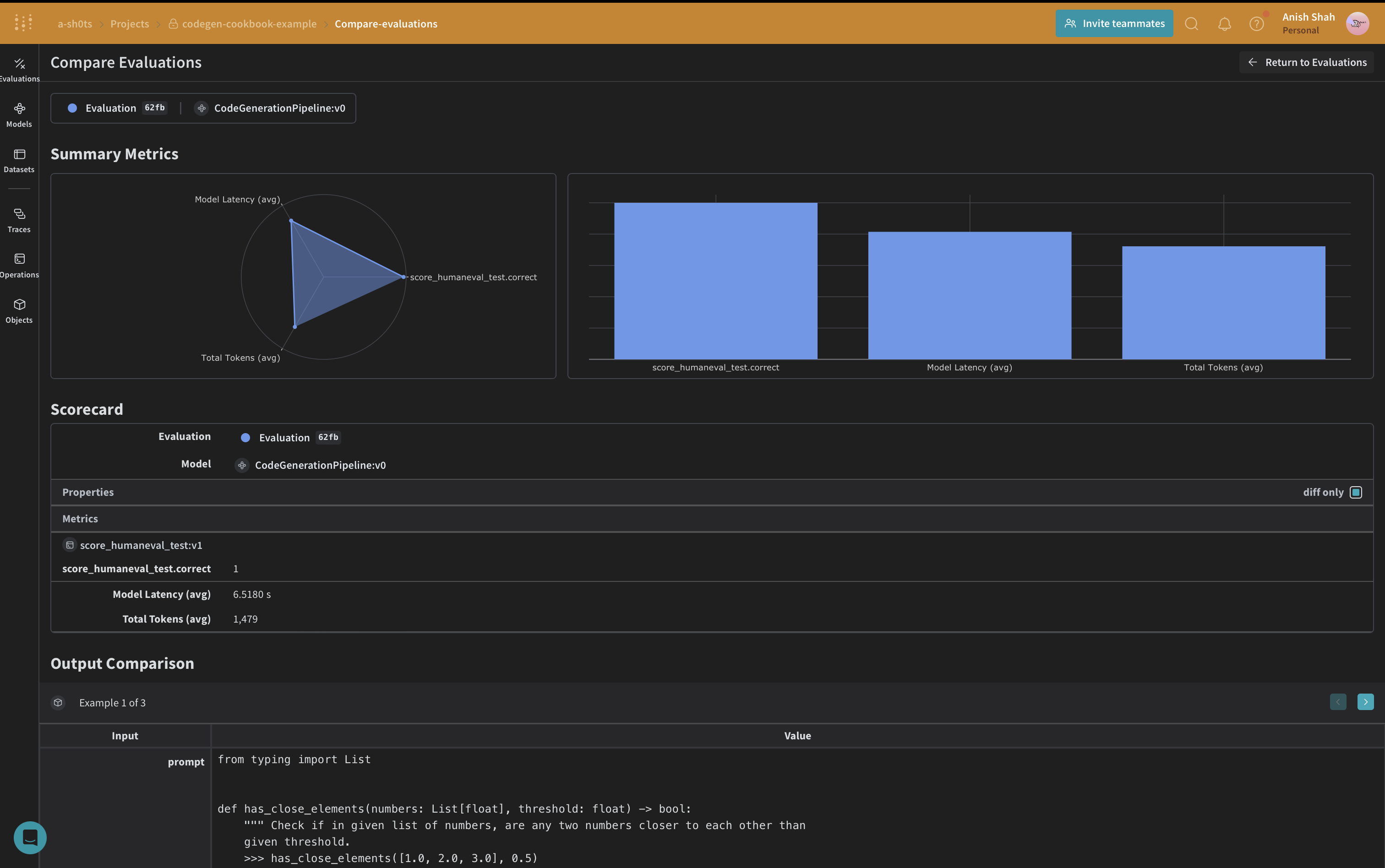
- LLM出力の評価:豊富なデバッグツールと視覚化を使用して、生成されたコードの評価を作成し比較します。
環境のセットアップ
まず、環境をセットアップし、必要なライブラリをインポートしましょう:
!pip install -qU autopep8 autoflake weave isort openai set-env-colab-kaggle-dotenv datasets
python
%%capture
# Temporary workaround to fix bug in openai:
# TypeError: Client.__init__() got an unexpected keyword argument 'proxies'
# See https://community.openai.com/t/error-with-openai-1-56-0-client-init-got-an-unexpected-keyword-argument-proxies/1040332/15
!pip install "httpx<0.28"
python
import ast
import os
import re
import subprocess
import tempfile
import traceback
import autopep8
import isort
from autoflake import fix_code
from datasets import load_dataset
from openai import OpenAI
from pydantic import BaseModel
from set_env import set_env
import weave
from weave import Dataset, Evaluation
set_env("WANDB_API_KEY")
set_env("OPENAI_API_KEY")
python
WEAVE_PROJECT = "codegen-cookbook-example"
weave.init(WEAVE_PROJECT)
python
client = OpenAI()
python
human_eval = load_dataset("openai_humaneval")
selected_examples = human_eval["test"][:3]
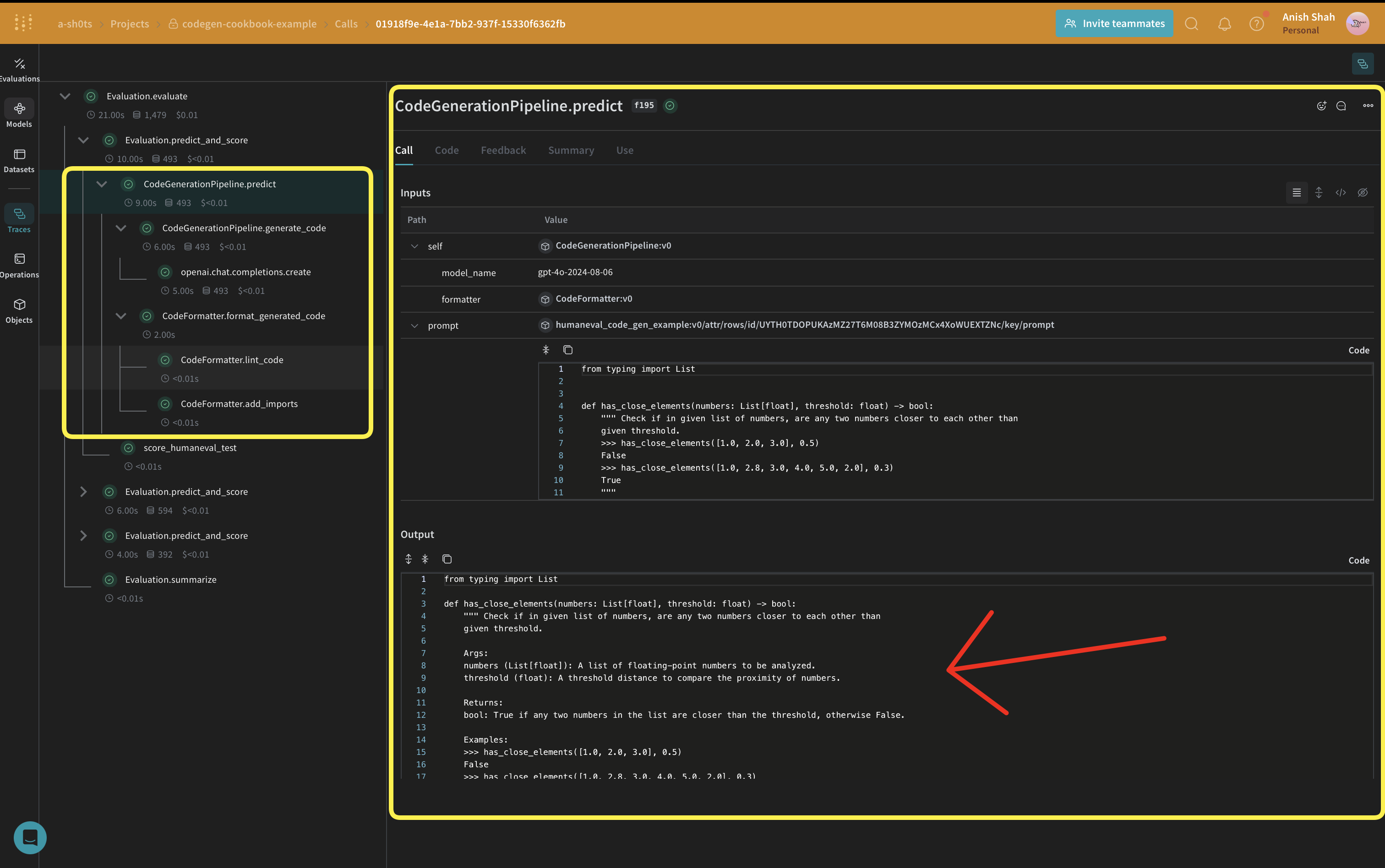
WeaveはOpenAI APIコールを自動的に追跡し、入力、出力、メタデータを含みます。つまり、OpenAIとのやり取りに追加のログ記録コードを追加する必要はありません - Weaveがバックグラウンドでシームレスに処理します。
構造化出力とPydanticモデルの活用
このコード生成パイプラインでは、OpenAIのstructured outputs modeとPydanticモデルを活用して、言語モデルからの一貫性のある適切にフォーマットされた応答を確保します。このアプローチにはいくつかの利点があります:
- 型安全性:期待される出力のためのPydanticモデルを定義することで、生成されるコード、プログラムランナー、ユニットテストに厳格な構造を強制します。
- より簡単な解析:構造化出力モードにより、モデルの応答を事前定義されたPydanticモデルに直接解析でき、複雑な後処理の必要性を減らします。
- 信頼性の向上:期待する正確なフォーマットを指定することで、言語モデルからの予期しないまたは不正な形式の出力の可能性を減らします。
以下は、Pydanticモデルを定義し、OpenAIの構造化出力で使用する方法の例です:
class GeneratedCode(BaseModel):
function_signature: str
function_args_with_docstring_within_triple_quotes: str
code_logic: str
class FormattedGeneratedCode(BaseModel):
full_code: str
コードフォーマッタの実装
一貫性のあるクリーンなコード出力を確保するために、CodeFormatterクラスをWeave操作を使用して実装します。このフォーマッタは、生成されたコード、プログラムランナー、ユニットテストにさまざまなリンティングとスタイリングルールを適用します。
class CodeFormatter(BaseModel):
@weave.op()
def lint_code(self, code: str) -> str:
# Replace escaped newlines with actual newlines
code = code.replace("\\n", "\n")
# Remove unused imports and variables
code = fix_code(
code, remove_all_unused_imports=True, remove_unused_variables=True
)
# Sort imports
code = isort.code(code)
# Apply PEP 8 formatting
code = autopep8.fix_code(code, options={"aggressive": 2})
return code
@weave.op()
def add_imports(self, code: str) -> str:
tree = ast.parse(code)
from_imports = {}
global_names = set()
for node in ast.walk(tree):
if isinstance(node, ast.Name) and node.id not in dir(__builtins__):
global_names.add(node.id)
# Only add typing imports that are actually used
typing_imports = global_names.intersection(
{"List", "Dict", "Tuple", "Set", "Optional", "Union"}
)
if typing_imports:
from_imports["typing"] = typing_imports
# Remove names that are defined within the function
function_def = next(
node for node in tree.body if isinstance(node, ast.FunctionDef)
)
local_names = {arg.arg for arg in function_def.args.args}
local_names.update(
node.id
for node in ast.walk(function_def)
if isinstance(node, ast.Name) and isinstance(node.ctx, ast.Store)
)
global_names -= local_names
global_names -= {"sorted"} # Remove built-in functions
# Construct the import statements
import_statements = []
for module, names in from_imports.items():
names_str = ", ".join(sorted(names))
import_statements.append(f"from {module} import {names_str}")
return (
"\n".join(import_statements) + ("\n\n" if import_statements else "") + code
)
@weave.op()
def format_generated_code(
self, generated_code: GeneratedCode
) -> FormattedGeneratedCode:
# Combine the code parts
full_code = f"{generated_code.function_signature}\n{generated_code.function_args_with_docstring_within_triple_quotes}\n{generated_code.code_logic}"
# Ensure proper indentation
lines = full_code.split("\n")
indented_lines = []
for i, line in enumerate(lines):
if i == 0: # Function signature
indented_lines.append(line)
elif i == 1: # Function arguments (docstring)
indented_lines.append(" " + line)
else: # Function body
indented_lines.append(" " + line)
full_code = "\n".join(indented_lines)
# Lint the code
full_code = self.lint_code(full_code)
# Add imports
cleaned_code = self.add_imports(full_code)
return FormattedGeneratedCode(full_code=cleaned_code)
このCodeFormatterクラスは、生成されたコードをクリーンアップしフォーマットするためのいくつかのWeave操作を提供します:
- エスケープされた改行を実際の改行に置き換える
- 未使用のインポートと変数の削除
- インポートの並べ替え
- PEP 8フォーマットの適用
- 不足しているインポートの追加
CodeGenerationPipelineの定義
では、コア部分のコード生成ロジックを実装しましょう:
私たちはweave.Modelを使用しているので、変更があった場合に自動的にバージョン管理されます。また、model_nameを属性として保持しているので、実験が容易で、Weaveで簡単に差分比較ができます。関数呼び出しを@weave.opで追跡しているので、入力と出力がログに記録され、エラー追跡とデバッグに役立ちます。
class CodeGenerationPipeline(weave.Model):
model_name: str
formatter: CodeFormatter
def __init__(
self, model_name: str = "gpt-4o", formatter: CodeFormatter | None = None
):
if formatter is None:
formatter = CodeFormatter()
super().__init__(model_name=model_name, formatter=formatter)
self.model_name = model_name
self.formatter = formatter
@weave.op()
async def predict(self, prompt: str):
generated_code = self.generate_code(prompt)
formatted_generated_code = self.formatter.format_generated_code(generated_code)
return formatted_generated_code.full_code
@weave.op()
def generate_code(self, prompt: str) -> GeneratedCode:
completion = client.beta.chat.completions.parse(
model=self.model_name,
messages=[
{
"role": "system",
"content": "You are an expert Python code generator.",
},
{"role": "user", "content": prompt},
],
response_format=GeneratedCode,
)
message = completion.choices[0].message
if message.parsed:
return message.parsed
else:
raise ValueError(message.refusal)
このCodeGenerationPipelineクラスは、Weave Modelとしてコード生成ロジックをカプセル化し、いくつかの主要な利点を提供します:
- 自動実験追跡:Weaveはモデルの各実行の入力、出力、パラメータをキャプチャします。
- Versioning: Changes to the model’s attributes or code are automatically versioned, creating a clear history of how your code generation pipeline evolves over time.
- Reproducibility: The versioning and tracking make it easy to reproduce any previous result or configuration of your code generation pipeline.
- ハイパーパラメータ管理:モデル属性(
model_nameなど)は明確に定義され、異なる実行間で追跡され、実験を容易にします。
- Weaveエコシステムとの統合:
weave.Modelを使用することで、評価やサービング機能などの他のWeaveツールとシームレスに統合できます。
評価指標の実装
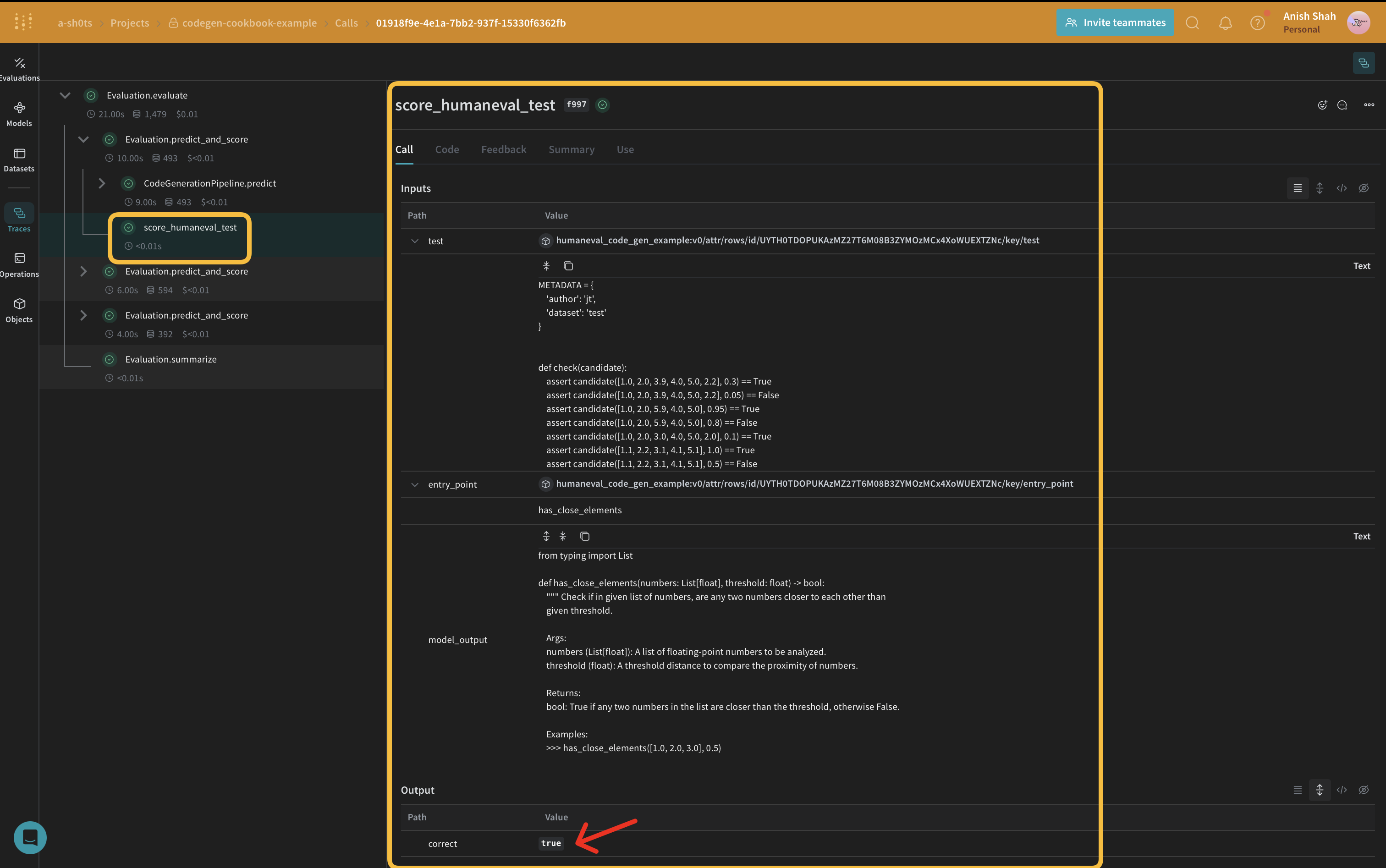
生成されたコードの品質を評価するために、weave.Scorerサブクラスを使用して簡単な評価指標を実装します。これにより、データセットの各scoreに対してmodel_outputを実行します。model_outputはpredict関数の出力から来ていますweave.Model。promptはデータセットhuman-evalから取得されます。
CODE_TEMPLATE = """
{model_output}
{test}
if __name__ == "__main__":
check({entry_point})
"""
python
@weave.op()
async def score_humaneval_test(test: str, entry_point: str, output: str):
generated_code = output
# Extract test cases from the test string
test_cases = re.findall(r"assert.*", test)
test_cases_str = "\n ".join(test_cases)
# Generate the full source code
full_code = CODE_TEMPLATE.format(
model_output=generated_code,
test=test,
test_cases=test_cases_str,
entry_point=entry_point,
)
# Create a temporary file to store the code
with tempfile.NamedTemporaryFile(delete=False, suffix=".py") as tmp_file:
# Write the generated code to the temporary file
tmp_file.write(full_code.encode())
tmp_file_path = tmp_file.name
try:
# Run the temporary Python file as a subprocess with a timeout
result = subprocess.run(
["python", tmp_file_path],
capture_output=True,
text=True,
timeout=10, # Timeout of 10 seconds
)
print(result)
if result.returncode == 0:
return {"correct": True}
else:
return {"correct": False, "error": result.stderr, "output": result.stdout}
except subprocess.TimeoutExpired:
return {"correct": False, "error": "TimeoutExpired"}
except Exception as e:
return {"correct": False, "error": traceback.format_exc()}
finally:
# Ensure the temporary file is removed after execution
os.remove(tmp_file_path)
これらの評価関数は生成されたコードを実行し、コードがデータセットから提供されたテストに合格したかどうかを示すブール値を返します。
Weave Datasetを作成し評価を実行する
パイプラインを評価するために、Weave Datasetを作成し評価を実行します:
formatted_selected_examples = [
{
"task_id": task_id,
"prompt": prompt,
"canonical_solution": solution,
"test": test,
"entry_point": entry_point,
}
for task_id, prompt, solution, test, entry_point in zip(
selected_examples["task_id"],
selected_examples["prompt"],
selected_examples["canonical_solution"],
selected_examples["test"],
selected_examples["entry_point"],
)
]
python
prompt_dataset = Dataset(
name="humaneval_code_gen_example",
rows=[
{
"prompt": example["prompt"],
"test": example["test"],
"entry_point": example["entry_point"],
}
for example in formatted_selected_examples
],
)
weave.publish(prompt_dataset)
python
EVAL_RUN = True
python
for model_name in ["gpt-4o-2024-08-06"]:
pipeline = CodeGenerationPipeline(model_name=model_name)
if not EVAL_RUN:
dataset = prompt_dataset.rows[2]
result = await pipeline.predict(dataset["prompt"])
score_result = await score_humaneval_test(
dataset["test"], dataset["entry_point"], result["generated_code"].full_code
)
else:
evaluation = Evaluation(
name="minimal_code_gen_evaluation",
dataset=prompt_dataset,
scorers=[score_humaneval_test],
)
results = await evaluation.evaluate(pipeline)
このコードはサンプルプロンプトでデータセットを作成し、humaneval テストスコアラーを定義し、コード生成パイプラインの評価を実行します。
この例では、WeaveとOpenAIの言語モデルを使用してコード生成パイプラインを実装する方法を示しました。以下の方法を紹介しました:
- コード生成プロセスの各ステップにWeave操作を作成する
- 簡単な追跡と評価のためにパイプラインをWeave Modelでラップする
- Weave操作を使用してカスタム評価指標を実装する
- データセットを作成し、パイプラインの評価を実行する
Weaveのシームレスな統合により、コード生成プロセス全体を通じて入力、出力、中間ステップを追跡でき、LLMアプリケーションのデバッグ、最適化、評価が容易になります。
Weaveとその機能の詳細については、Weave documentationをご覧ください。この例を拡張して、より大きなデータセットを処理したり、より洗練された評価指標を実装したり、他のLLMワークフローと統合したりすることができます。